Category Archives: HeroMachine 3

HM3: The pitter-pattern of a new release's little feet

And with that I hopefully am out of “pattern” puns. In any event, I’ve just posted an update to the HeroMachine 3 Alpha (use the “HM 3 Preview” button in the header) that includes 24 new semi-transparent patterns in addition to the 8 the program already had. The complete list of patterns is now:

  • hex
  • scales
  • rivets/dots
  • camo
  • fishnet
  • dirt/blood
  • banded metal
  • circuits
  • tiger stripes (not entirely happy with this one, it may change)
  • cheetah spots
  • leather/squiggly bits
  • hair
  • chainmail links
  • tartan
  • cracked earth/rock
  • bandages
  • vertical narrow light stripes
  • vertical thick light stripes
  • vertical narrow dark stripes
  • vertical thick dark stripes
  • horizontal narrow light stripes
  • horizontal thick light stripes
  • horizontal narrow dark stripes
  • horizontal thick dark stripes
  • stars
  • hearts
  • checkerboard
  • stylized flames
  • electrical arcs
  • dark smoke
  • light smoke
  • starfield

That’s probably going to be it, because there are now enough objects in the basic shell app that it’s starting to slow down. I think Flash CS3 has a problem when you put too many things in the library, it really slows to a crawl. If I add too much more it’s going to be really irritating to work on.

In addition to those 32 built-in grayscale patterns, there is now a “Patterns” slot with one set of items, “Standard”. The items in this set are just like any other items in that they can be colored, sized, rotated, etc. To get the effect, load up the item you want to be filled with the colorable pattern. Then load the pattern, click “Mask”, and click on the target item to be filled. Just like any other masking effect.

The nice thing about that is you can, for instance, have blue stars with a sprinkling of yellow ones filling a dark blue body. Or red and orange flames scaled to size to fill a deep red body, making it look like he’s full of fire. With the integrated grayscale patterns you can’t do that, you have to rely on the color of the original item to carry off the effect.

Here’s a sample of what I mean, with the “loaded as an item, colored, and masked” effect on the left and the “just use the built-in grayscale pattern” on the right:
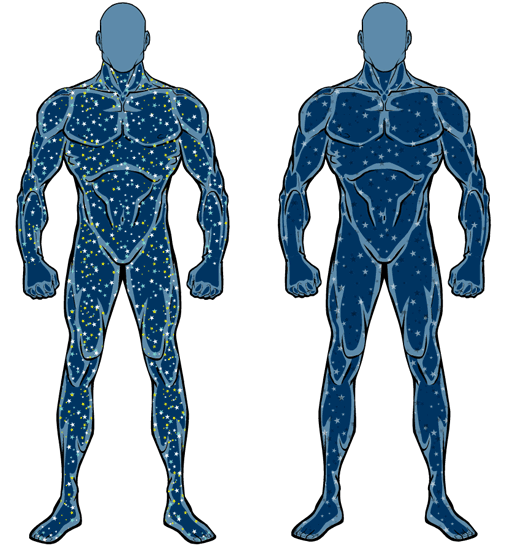
starfields

Should I keep both the integrated patterns and the loadable, colorable set? One or the other? Neither?
HM3: A pattern is emerging …

The HM3 Alpha applet has been updated again. The pattern buttons now work, and the problem where you couldn’t manually drag items more than halfway to the left and down has been fixed.

You might need to hit REFRESH in your browser to reload the most current version of the applet if you’ve been there recently.

Edited To Add: Also, I added a “LegwearMaleBriefs” set of starter items so your guys don’t have to be nekkid so much. More of those to come, obviously.

HM3: Patterns

I’d like to have a LOT more patterns in HeroMachine 3 than the minis had, to the point that you’ll have a set of basic clothing options in the various slots that you can then turn into chainmail or full of lightning or Scottish tartan or whatever. Here’s the list I have so far, let me know any additions or deletions you might have:

  • zebra
  • leopard
  • cheetah
  • tiger stripe
  • fur
  • leather
  • stone
  • metallic
  • cement
  • rusted/dirty
  • hexes
  • scales
  • rivets
  • camo
  • fishnet
  • banded armor
  • cracked earth
  • chainmail
  • stripes – horizontal
  • stripes – vertical
  • circuits
  • stars
  • checkerboard
  • webs
  • bark/wood
  • crystalline/icy
  • flames
  • lightning
  • reptile skin (gradient filled tight circles)
  • paisleys
  • smoke
  • tartan

HM3: Alpha JPG tweak

Just a quickie update, the HM3 Alpha “Save as JPG” feature now saves the figure and not just its left leg. Oops.

HM3: Alpha update

I’ve updated the HeroMachine 3 Alpha with the following changes:

  • Masking now works. More on that below.
  • Flipping items now works (though if you then scale it, it will flip back, a bug I hope to fix soon).
  • Paintbrush feature now works (applies the current color scheme to whatever you click on).
  • Color Hair now works (click it applies the current hair item’s color scheme to all “hair” type items).

More on all of this after the jump.

Continue reading

HeroMachine 3 open Alpha

With that rather cryptic and Star-Trekkie-like headline, I am happy to announced that the early test version of the upcoming HeroMachine 3 is now available! Please note all of the caveats and disclaimers and warnings of incompleteness at the top of the page — this is a very, very early look at the program, there are lots or more items and features yet to be implemented. Only about half the slots even have any items in them.

So yes, there will be eyes and noses and mouths and pants and gloves and boots and all that other stuff, in time.

Regardless, that page will always have the most up-to-date version of the test program I have.

What I’m looking for at this point is very broad feedback, things like how you feel the multiple item functionality works; whether or not the little toolbars in the preview of each item makes sense and has the buttons you want on it; does the organization of the items in the various slots work; etc. I’m fully aware that there are (not to get too technical) “a crapload” of features that while mostly working are still quite buggy, like the item selection getting hosed up if you mouse out of the menu area and scaling “all items” only works horizontally, that kind of thing.

Anyway, please make any suggestions, observations, complaints, requests (either items or features), or quips you like in the comments to this post. Whenever I launch an update I’ll make a new entry for it and we can go from there.

Thanks already for all the great feedback I’ve received so far; with your help this program will absolutely kick ass!

HM3: Tech tops and multiples

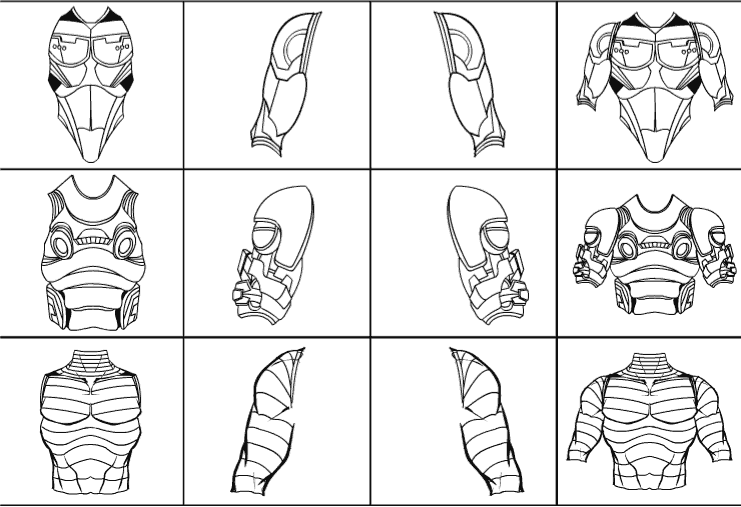
I wanted to show you some of the “Tops” items I’ve been working on for HeroMachine 3:

This is the second page of items; the first is all stuff from the Modern Warrior Mini, which you’ve already seen. Note that I’ve broken these items down into four types — vest only, left arm only, right arm only, and complete item. I did this so that you could mix and match “sleeves” with various torso pieces. For instance, maybe you like the first chest piece, but you want to couple it with the big bulky arm pieces in the middle row. With these items broken apart, it’s no problem.

I also wanted to include the completely assembled pieces for those who don’t want to be bothered with selecting and coloring three different things, but who want just one to do it all. That works fine if you don’t want to move the figure’s arms, and more advanced users can easily hand-assemble the units they want.

I’ve been struggling mentally with how to organize all this stuff. Originally I was planning on having “Body” broken up into like seven different slots, including upper & lower arms, upper & lower legs, etc. But the more I got into it, the more it seemed like that would impose a high burden on the user to have to go through and pick all those pieces. I want HM3 to be just as easy to use as 2.x was for kids or lazy people (like me). Then I started thinking that having a bunch of “sleeves” in “Right Upper Arm” was overkill and confusing. If you’re trying to dress a character, you’re going to be looking where the rest of the shirt is, you know?

It’s starting to look like “multiple items” is going to pretty much be a very necessary thing. Having the mini toolbars right there on each item preview makes this less of a pain than you might think, as you can cycle through items pretty easily, quickly getting rid of the ones that don’t work.

I hope to have the alpha (it’s not really even a beta yet) posted very soon so you can play around and see if this approach works in actual usage or not.

META: FAQ updated

I’ve updated the HeroMachine FAQ page with HeroMachine 3-related material. Holler if you think of any I left out.

HM3: Flying legs

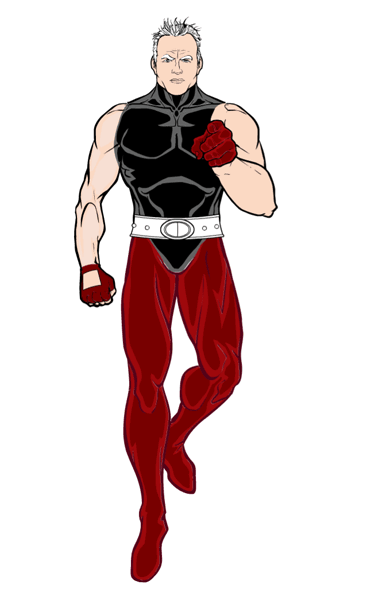
Or are they walking legs? Either way, here’s a quick screen grab of the legs I just added to the “BodyMaleStandard” set:

flying

HM3: Here's the point

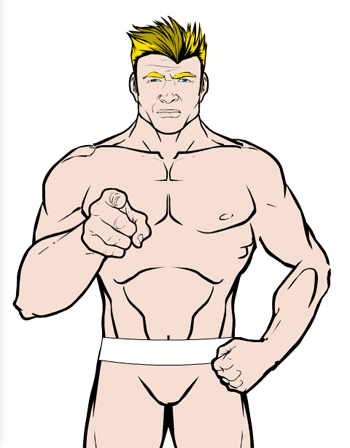
I spent the weekend ironing out a persistent and irritating bug that was preventing me from making item set selection easier. To reward myself for my virtuous persistence, today I am drawing. Specifically, I am following up on Kaldath’s suggestion that I draw as many arm positions as possible in the “Body” sets to increase the flexibility of the character’s position. To wit:

pointing

The body in the image is made up of seven different items — torso, left & right upper arms, left & right forearms, and left & right legs. They’ve been layered, sized, and moved to create the given effect, along with one of the new RightHand items.

As you can see there are a few gaps in the lineart — the figure’s left elbow doesn’t quite match up, and the left wrist is a bit choppy, but I don’t think that’s avoidable given how freely all these items can rotate and the need to account for one being layered on top of another. Luckily the “outline” feature hides a myriad of these sorts of sins.

Next I think I’ll be working on more and alternate leg positions as well.

The drawback to all of this, of course, is that not all of the gloves are going to fit on that foreshortened forearm. And if I draw legs in the classic “flying guy” sort of pose (as I plan to), not all the pants or boots will fit either. But given that you can color the various body segments individually, it ought to be possible to make a pretty convincing body suit in any of these configurations regardless.