I’ve just released some additional items for the Backplane -> Auro set, more “speed lines” to make your character GO FAST! I hope you like them.
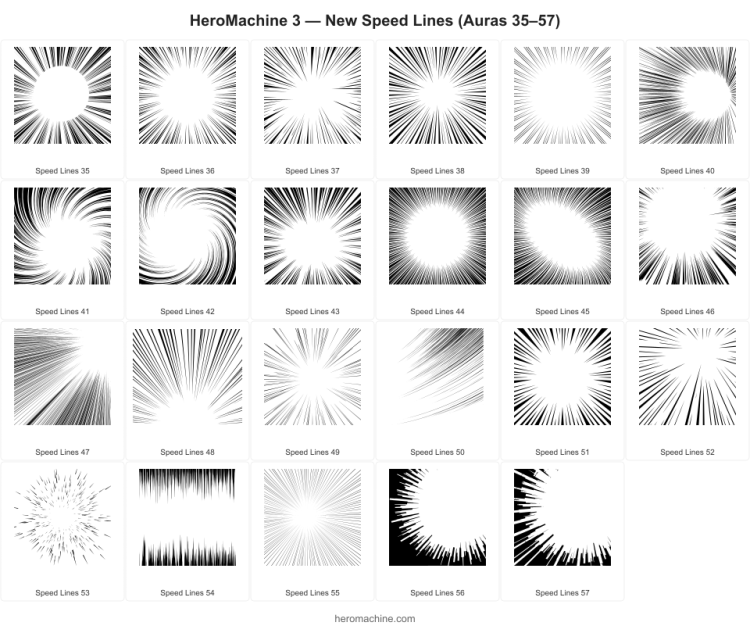

I’ve just released some additional items for the Backplane -> Auro set, more “speed lines” to make your character GO FAST! I hope you like them.
Posted in HeroMachine 3, New Item Releases, News & Updates
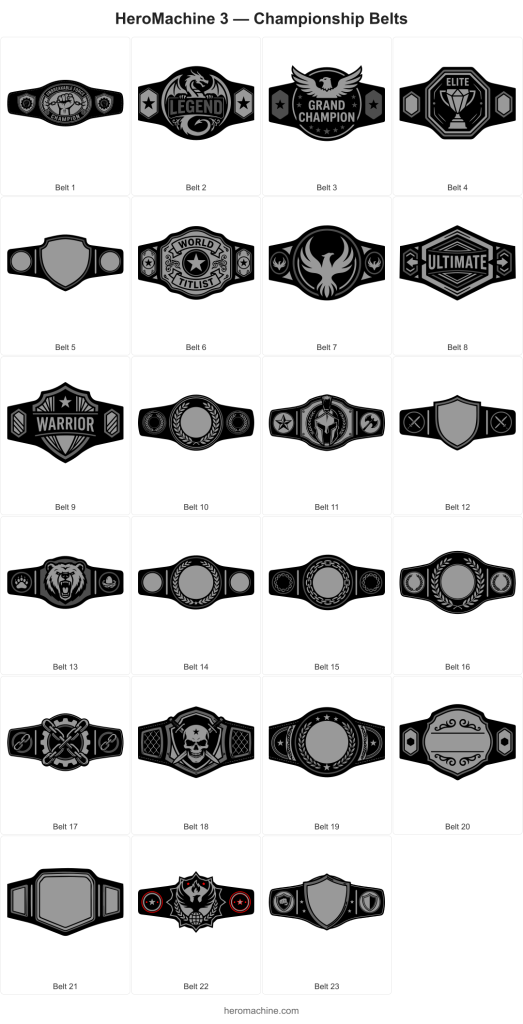
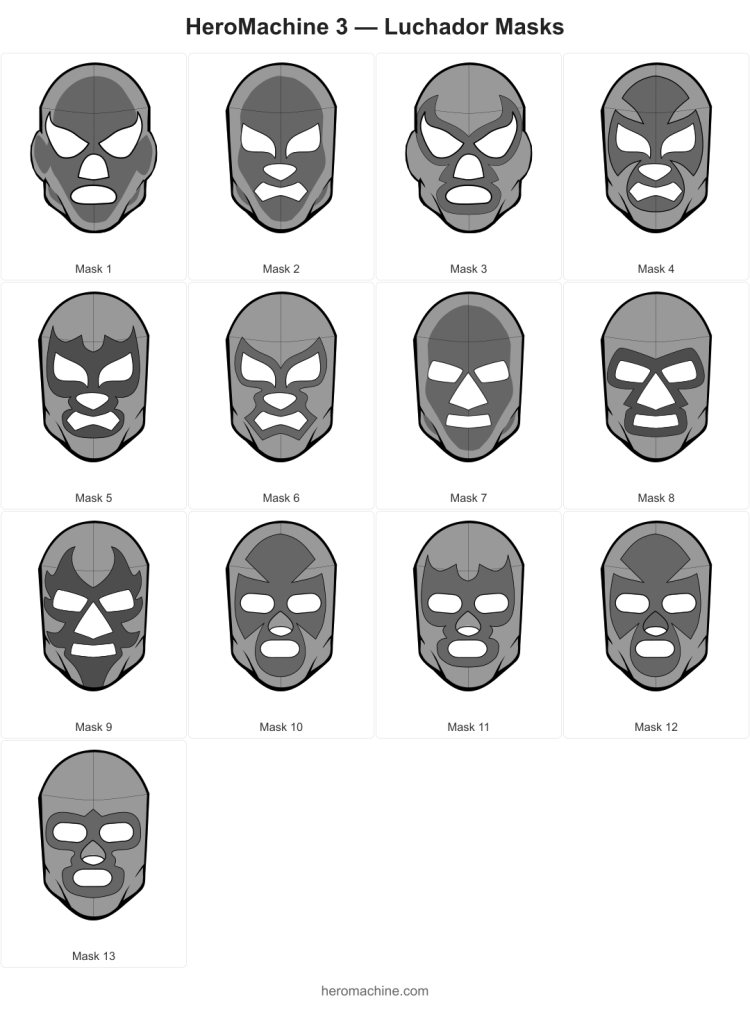
With many thanks to all the folks who’ve requested these kinds of items and who’ve waited patiently for literally years, and especially to AMS and Colby Primeaux for timely reference and guidance, I’m happy to launch two new wrestling-themed sets, Headgear -> Luchador and Belt -> Championship.
The belts are a little unusual, ones with nothing in the big center area have the itemMask set to that shape, so you can position Insignia or other items to fill it without the edges bleeding over.
On the masks, this is just a basic starter set. I don’t know the world of wrestling all that well, but I included a few blank masks with the eyes/nose/mouth holes cut out so you can mask other items onto it to get the custom look you want, hopefully.
Enjoy!
Posted in HeroMachine 3, New Item Releases, News & Updates
I’m working on the Luchador masks lots of folks have requested over the years and I’m struggling a bit because I don’t know that world at all. Here’s what I have so far, what direction should I go from here?
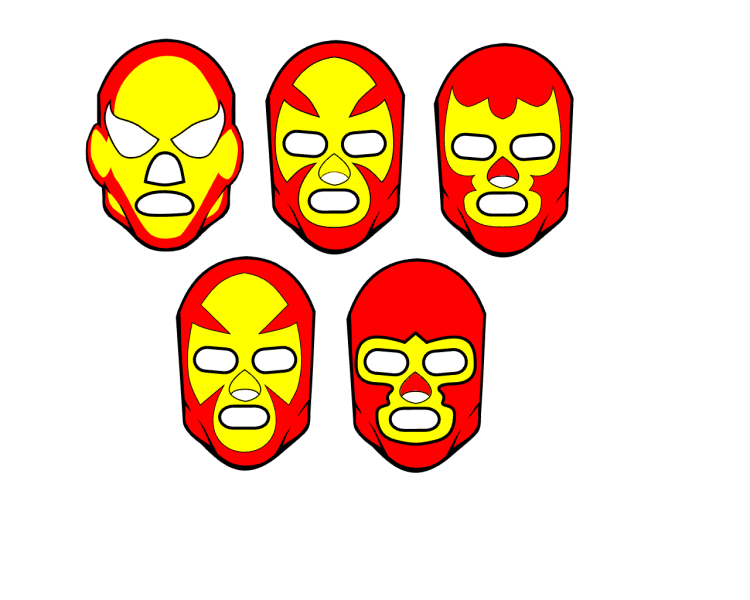
Should I be adding seams to make them more realistic? Come up with a set of x patterns (the yellow area shapes) that get repeated across different eye/nose/mouth shapes? Make a blank overall head/mask pattern, then add individual eye/nose/mouth shapes that you could apply the skin color to, then mask eyes/noses/mouths to from their sets? Add shading for that interior head color on all items (the yellow area on that first example)? Ears or no ears?! I’m floundering!
I really don’t know where to go from here. I also haven’t found a great image reference for these so I don’t know what kinds of designs are useful.
Help?
Posted in HeroMachine 3, Meta
Dblade continues to impress, this time with two new helmets that are built with 3 individual items each. 6 Items total. Here’s a preview of the individual Items along with a preview of them placed together for the full effect.
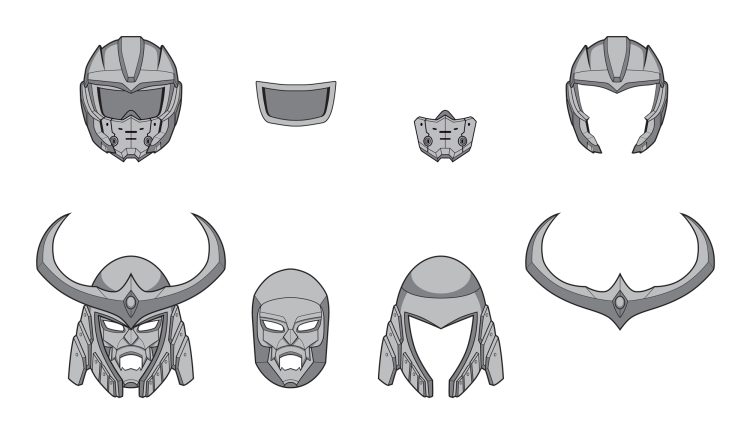
These were based on some requests from Yuri Lucia, so shoutout to both him and Dblade!
Posted in HeroMachine 3, New Item Releases, News & Updates
Cracking good artist Dblade has whipped up a great set of new Item Right/Left -> Energy for all your sci-fi Indiana Jones needs. Please thank him in the comments for his ongoing excellent work!
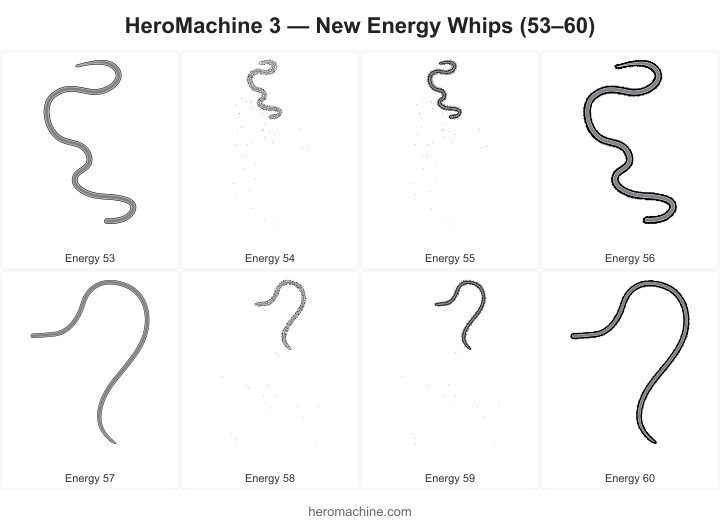
Posted in HeroMachine 3, New Item Releases, News & Updates
I keep telling people “I’ll add it to The List” when asked for specific items. But what IS The List?! Well, now you don’t have to wonder, because here it is. If you want to add something(s) to it, let me know.
Done:
Outstanding (from long-time user, 2026-04-07):
Hands:
Hair:
Body/Legs:
Feet:
Heads:
Nose:
Outstanding (from community user, 2026-04-09):
Heads/Headgear:
Body/Tops:
Arms/Hands:
Legs/Feet:
ItemRight/ItemLeft:
BackPlane:
Companions/Full Figures:
Outstanding (from community users, 2026-04-18):
Weapons/Items:
Vehicles/Props:
Headgear:
Hands:
Heads/Headgear:
Tops/Body:
Face:
Companions:
Backgrounds:
Tops/Clothing:
Weapons/Items (additional):
Outstanding (from community user, 2026-04-23):
Heads:
Outstanding (from community user, 2026-04-22):
Weapons/Items:
Outstanding (from community user, 2026-04-20):
Tops/Clothing:
Outstanding (from community user, 2026-04-19):
Hair:
Tops/Clothing:
General Themes:
Outstanding (from community user, 2026-04-30):
Tops/Clothing:
Outstanding (from community users, 2026-05-02):
Tops/Clothing:
Face:
Outstanding (from community user, 2026-05-06):
Ears:
Outstanding (from community user, 2026-05-13):
Hands/Gloves:
Posted in HeroMachine 3
Several folks have reached out since the relaunch observing that there were some oddities with colors on a number of items. THANK YOU to those people!! After getting some more details and digging into it, I realized that the original import process from Flash to SVG files completely mistreated the “details” layer. Sometimes an item needed a static colored area that can’t be changed, like the whites of the eyes, white teeth in Mouth sets, or wheels on cars. Other times I they’d have a semi-transparent overlay to create highlighted or shadowed areas.
The import ignored all that and made them all solid, which had … less than desirable results.
I’ve pushed a bunch of fixes, though, so hopefully things should look more like you’d expect. Here’s one before image of a fantasy armor top:
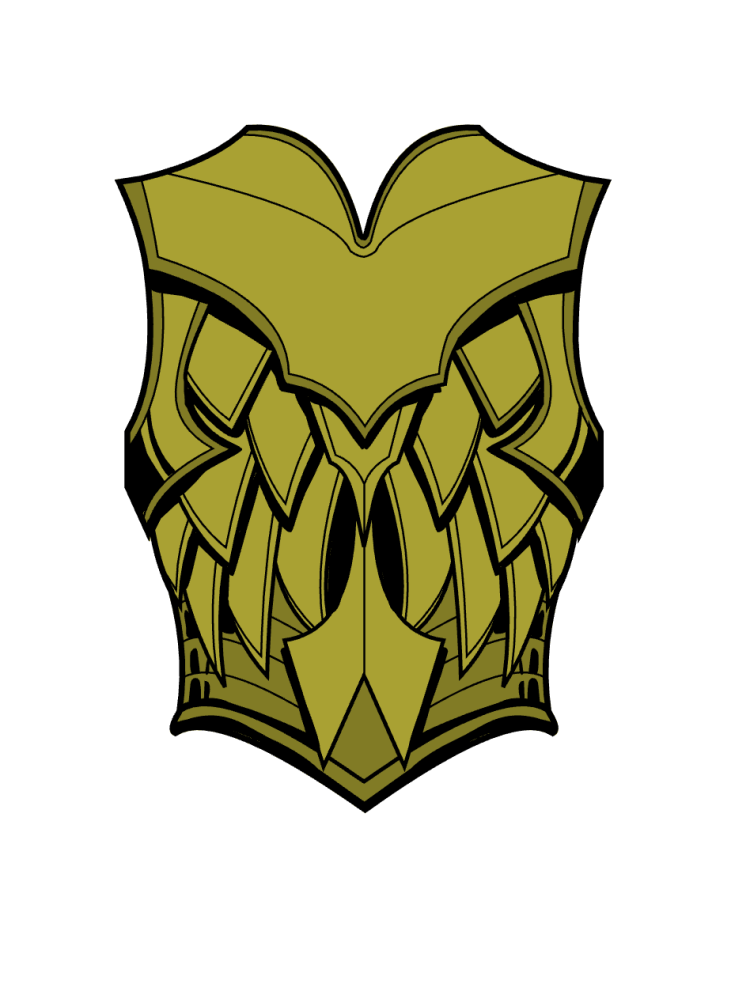
You can see black areas between the middle part, on the outer edges under the armpits, and the stripes along the stomach outer edges. You might think that looks fine, and it probably does, but it’s not how it looked in the original Flash version. After the fix, here’s that same item:
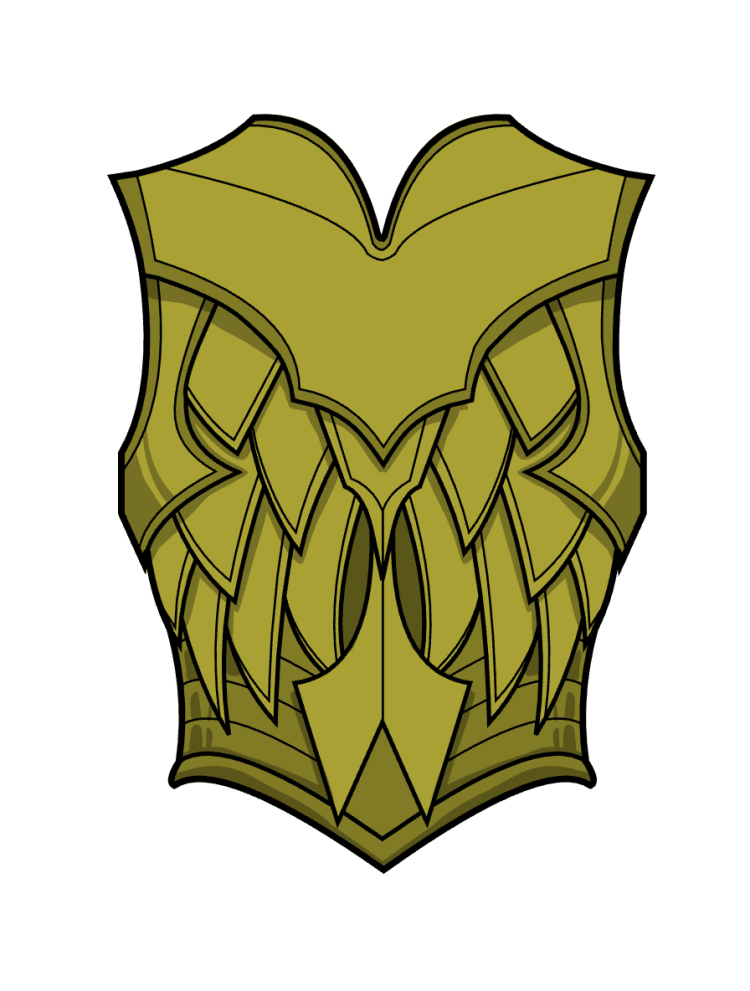
Here you can see the same areas are semi-transparent overlays instead of solid blacks, allowing the undercolor to show through. It’s a much more dynamic and nuanced effect and what I intended with the original.
For the detail-oriented among you (which I, clearly, am not or I’d have noticed this before), here’s the complete updated set list:
| Item Set | Items Fixed | Detail Paths Corrected |
|---|---|---|
| Background Floors | 28, 31 | 2 |
| Background Furniture | 4 | 1 |
| Background Landscapes | 16, 17, 19, 20, 21, 25 … (17 total) | 17 |
| Background Sky | 15 | 1 |
| Backplane Standard | 10, 19 | 2 |
| Backplane Tech | 10, 12 | 2 |
| Backplane Wings | 7, 8, 10, 22, 67, 72 … (14 total) | 97 |
| Belt Military | 19, 28, 33, 38 | 38 |
| Belt Standard | 40, 74, 75, 76 | 38 |
| Belt Standard Female | 40 | 1 |
| Body Mech | 39, 40, 41, 42, 48, 49 | 191 |
| Companion Standard | 76 | 1 |
| Companion Vehicles | 23, 33, 35, 37, 39, 40 … (17 total) | 396 |
| Eyes Female Standard | 99, 100 | 2 |
| Eyes Standard | 99, 100 | 2 |
| Foot Left Male Standard | 12, 14, 38 | 3 |
| Foot Right Male Standard | 12, 14, 38, 97, 100 | 10 |
| Foot Right Male Tech | 39 | 7 |
| Foot Right Monster | 23, 25 | 4 |
| Glove Right Female | 9, 10, 11, 32, 38 | 5 |
| Glove Right Standard | 10, 11, 32, 38, 62, 64 … (14 total) | 187 |
| Hair Standard | 75 | 1 |
| Head Aliens | 65, 66, 71, 72, 85, 86 | 6 |
| Head Animals | 22, 41, 44, 47 | 6 |
| Head Male Face | 7, 8 | 2 |
| Head Mech | 10, 15 | 20 |
| Head Winners | 1 | 1 |
| Head Zombie Face | 8 | 1 |
| Headgear Fantasy | 3, 4, 6, 16, 42, 49 … (12 total) | 20 |
| Headgear Glasses | 37, 51, 52, 53, 54, 57, 58 | 25 |
| Headgear Mask | 72, 75 | 51 |
| Headgear Mask Female | 65, 66 | 2 |
| Headgear Military | 1, 5, 9, 33, 35, 48 | 73 |
| Headgear Modern | 7, 10, 13, 27, 28, 37 … (26 total) | 978 |
| Headgear Standard | 3, 4, 6, 38, 40, 47 | 6 |
| Item Right Blades Two | 100, 101 | 7 |
| Item Right Blunts | 82 | 1 |
| Item Right Miscellaneous | 1, 2, 3, 9, 10, 47 … (12 total) | 14 |
| Item Right Music | 29, 33, 34, 35 | 4 |
| Item Right Polearms | 11, 12, 13, 15, 16, 18 … (14 total) | 14 |
| Item Right Shields | 5, 8, 11, 70 | 4 |
| Item Right Tech | 24, 25 | 38 |
| Legwear Female Outerwear | 5, 8 | 2 |
| Legwear Female Standard | 12, 20 | 2 |
| Legwear Male Outerwear | 5, 8 | 2 |
| Legwear Male Spandex | 29, 30, 31, 32, 33, 34 … (9 total) | 9 |
| Legwear Male Standard | 12, 20 | 2 |
| Mouth Female Standard | 69 | 1 |
| Mouth Standard | 69, 80, 82 | 4 |
| Neckwear Standard | 40, 47, 50, 51, 65 | 19 |
| Shoulder Left Tech | 10 | 1 |
| Shoulder Right Capes | 6 | 1 |
| Shoulder Right Tech | 10, 25, 26 | 9 |
| Shoulders Tech | 10 | 1 |
| Tops Female Bustiers | 30, 40, 55, 56, 57 | 5 |
| Tops Female Coats | 68, 69 | 2 |
| Tops Female Dresses | 26 | 1 |
| Tops Female Fantasy Armor | 19, 20, 21, 22, 23, 24 … (16 total) | 16 |
| Tops Female Fantasy Common | 67 | 1 |
| Tops Male Coats | 68, 69 | 2 |
| Tops Male Fantasy Armor | 9, 19, 20, 21, 22, 23 … (18 total) | 18 |
| Tops Male Fantasy Common | 67 | 1 |
| Tops Male Standard | 37 | 1 |
| Tops Male Tech | 1 | 1 |
| Totals | 303 items (+ 69 mirrored Left counterparts) | **2,382 |
| paths** |
All Right-side handheld items, gloves, feet, and shoulders were also mirrored
to their Left-side counterparts, bringing the effective total to 372 items
fixed.
Thanks again to the HeroMachiners kind enough to take the time to point out the issues, much appreciated. I am far from perfect and absolutely would have missed all of this if not for your attention and care.
Posted in HeroMachine 3, News & Updates
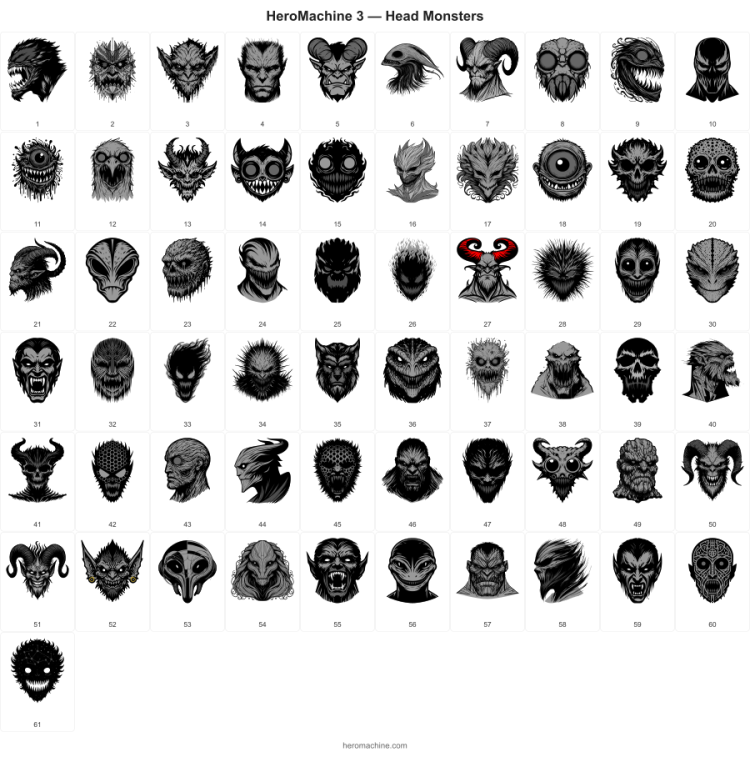
I’ve just released what I hope is a fun new set of items, Head->Monsters. It features a variety of different kinds of complete (eyes, noses, ears, mouths, etc.) heads in several different styles. I also am continuing to experiment with items that are not 100% front-facing, so you’ve got some profiles and such. I hope you like them!
Dblade continues to do great work adding to the Nose set, I just pushed his updates to the live site:
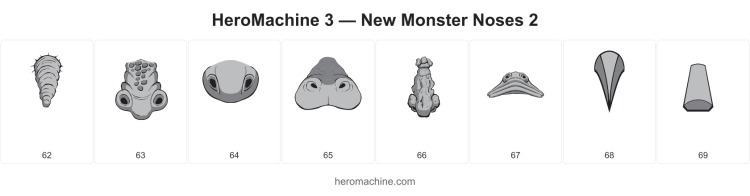
These are available for your monster-creating convenience now in both male and female Nose sets. Enjoy and please thank Dblade!
Posted in HeroMachine 3, New Item Releases, News & Updates
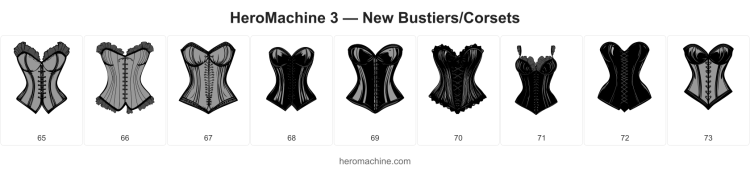
I’ve just released 9 new items in the Tops – Female – Bustiers set. Enjoy!
Posted in HeroMachine 3, New Item Releases, News & Updates
 Three middle-aged nerds (including yours truly!) review all of the MCU movies in chronological order. Short, funny, and full of good vibes, check it out and let us know what you think!
Nerdmudgeon.com
Three middle-aged nerds (including yours truly!) review all of the MCU movies in chronological order. Short, funny, and full of good vibes, check it out and let us know what you think!
Nerdmudgeon.com