Category Archives: HeroMachine 3

HM3: The other shoe drops

I just updated the HM3 Alpha with the “LeftFootMaleStandard” set, so now you can have a shoe on each foot if you like.

HM3: The game is afoot!

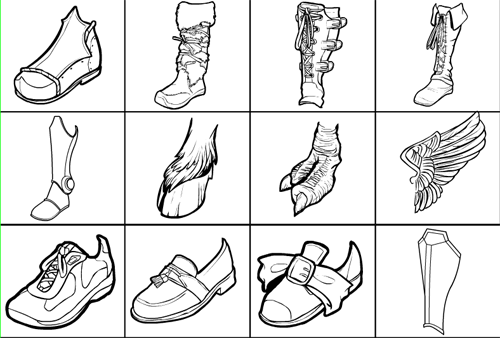
I’ve posted a new update to the HeroMachine 3 Alpha. The big addition is the “FootRightMaleStandard” set, so you can start shoe-ing your creations. The FootLeft will be coming in the next day or two, but in the meantime you can use the “flip” button to get by. Just find the shoe you want, click the “multiples” button, add the same shoe again, click the “Flip” button, and put it where you want for a matching pair. Here’s a taste of the new items:

footwear

Also in this update I’ve changed the sort order on the slot dropdowns. Before the slots were listed in stack order, starting from the bottom layer (which currently is “Backplane”) and working its way up. Now it’s just in alpha order. Let me know which you prefer, it’s easy enough to change.

I also made the two dropdown boxes a bit larger, both for ease-of-reading and because before I had unknowingly shrunk them, which made it really hard to line everything up properly. It was really irritating. Now it’s all scaled at 100% and my math is working.

Finally, I changed the wording on the “allow multiples” radio button. Before it would say “Allow multiple Body items? YES/NO”, which I think is clearer, but it was all jammed up in there and looked crappy. I reduced it to read “Multiples/Singles”, but I don’t know if that’s going to be obvious or not. It’s a very important piece of functionality that I don’t think is immediately intuitive, so any feedback you have on the best way to present it would be appreciated.

Let me know any other foot-type items you want. I decided to consolidate Footwear into just Foot, since there aren’t that many plain old feet I could think of. Plus, with the Multiples thing, it works out a little better this way.

I will be adding a “LegwearKneepads” set as well for those sorts of items. I’ve got several from the Lordi and Warrior applet that are cool and deserve to be included, plus I want to include some medieval knight-type knee protectors.

HM3: Yet more colors

All right, I admit it — Damien and Fabien (brothers, mayhap?!) were right and I was wrong. There actually were more colors in HM2.5 than were in the beta, which clearly is unacceptable. So I spent most of the day on Sunday redoing the color palette to match the one in 2.5 and have posted the updated version to the HM3 Alpha page.

The colors now are arranged in the classic cascading rainbow gradient like you’d see in most commercial image manipulation applications. I added on a few metallic colors at the end for good measure. Plus, you still have the 25 dedicated skin tone colors at the end separated out into their own rows for ease of use.

If there are colors you wanted to see but don’t, let me know.

HM3: Color layout tweak

With thanks to Damien for reminding me it needed work, I’ve reorganized the color swatch layout for the HM3 Alpha. They’re now in Roy G. Biv order, except for browns and skin tones after, and grayscale before.

You’ll note that the last four rows look awfully similar. I’m open to suggestions for replacement colors to take up at least one of those four rows (which are basically repeats of the skin tones). I do want probably a whole row of browns in addition to the skin tones, for leather and such. But that leaves a lot of others to fill.

A color challenge

Damien has pointed out that the arrangement of the color swatches in HM3 lacks something. Specifically, it lacks a coherent order. If someone wants to take the set of colors and arrange them in a way that makes more sense, I’d appreciate it. I suck at that kind of thing, but I’ll take a crack at it if no one else wants to. Complete list for ease of cutting-and-pasting after the jump.

Continue reading

HM3: Houston, we have spandex

I’ve now added a set of “LegwearMaleSpandex” items to the HeroMachine 3 Alpha. Enjoy! Holler if there are spandex variations you’d like to see. I’m thinking I should probably include at least the flying-type full-length leggings too.

HM3: We got pantsed

I’ve just updated the HeroMachine 3 Alpha with the “LegwearMaleStandard” set of items. All of the basic items from HeroMachine 2.0’s Pants set are there, plus a bunch. Some of the more esoteric suggestions from the last thread will have to wait for specialized sets, but I’ve got them written down. I wanted to get the basics in first. Holler if you see anything egregious missing.

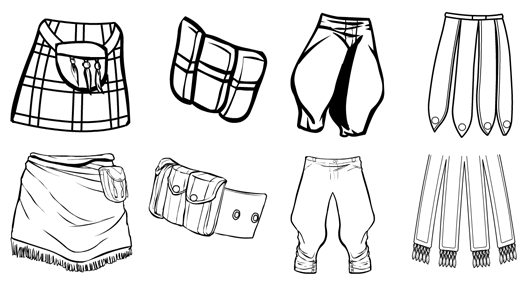
I hope you like them! Just as a teaser, here’s a set of four items from the HeroMachine 2.0 Pants-Standard genre side-by-side with their new versions in the HeroMachine 3.0 LegwearMaleStandard set:

legwear-comparison

HM3: Calling all pants

I am currently drawing new Pants for HM3 (to be known as “Legwear”). Post any requests you have for pants-like items.

HM3: Webs

Thanks to subtle reminders, I’ve added a dark and a light web pattern to the HM3 Alpha. I also changed the interface so that when you delete an item in a slot, you stay in that slot.

HM3: The pitter-pattern of a new release's little feet

And with that I hopefully am out of “pattern” puns. In any event, I’ve just posted an update to the HeroMachine 3 Alpha (use the “HM 3 Preview” button in the header) that includes 24 new semi-transparent patterns in addition to the 8 the program already had. The complete list of patterns is now:

  • hex
  • scales
  • rivets/dots
  • camo
  • fishnet
  • dirt/blood
  • banded metal
  • circuits
  • tiger stripes (not entirely happy with this one, it may change)
  • cheetah spots
  • leather/squiggly bits
  • hair
  • chainmail links
  • tartan
  • cracked earth/rock
  • bandages
  • vertical narrow light stripes
  • vertical thick light stripes
  • vertical narrow dark stripes
  • vertical thick dark stripes
  • horizontal narrow light stripes
  • horizontal thick light stripes
  • horizontal narrow dark stripes
  • horizontal thick dark stripes
  • stars
  • hearts
  • checkerboard
  • stylized flames
  • electrical arcs
  • dark smoke
  • light smoke
  • starfield

That’s probably going to be it, because there are now enough objects in the basic shell app that it’s starting to slow down. I think Flash CS3 has a problem when you put too many things in the library, it really slows to a crawl. If I add too much more it’s going to be really irritating to work on.

In addition to those 32 built-in grayscale patterns, there is now a “Patterns” slot with one set of items, “Standard”. The items in this set are just like any other items in that they can be colored, sized, rotated, etc. To get the effect, load up the item you want to be filled with the colorable pattern. Then load the pattern, click “Mask”, and click on the target item to be filled. Just like any other masking effect.

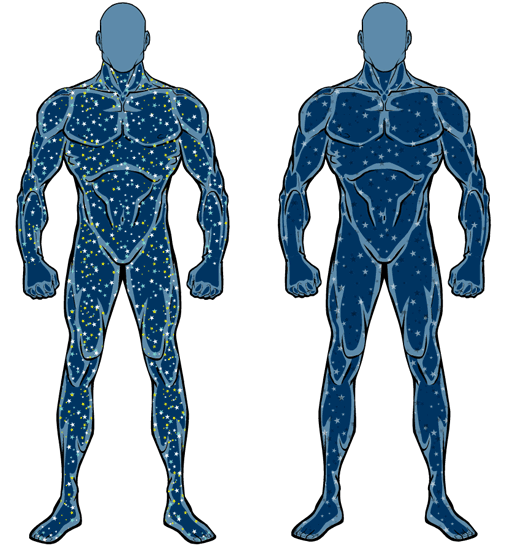
The nice thing about that is you can, for instance, have blue stars with a sprinkling of yellow ones filling a dark blue body. Or red and orange flames scaled to size to fill a deep red body, making it look like he’s full of fire. With the integrated grayscale patterns you can’t do that, you have to rely on the color of the original item to carry off the effect.

Here’s a sample of what I mean, with the “loaded as an item, colored, and masked” effect on the left and the “just use the built-in grayscale pattern” on the right:

starfields

Should I keep both the integrated patterns and the loadable, colorable set? One or the other? Neither?