
Category Archives: HeroMachine 3

HM3: I saw the sign (and it opened up my eyes)

We have insignia! One hundred of them, to be exact, by far the largest number of items in any set in HeroMachine history. And to think just a few days ago I was wondering what in the world I’d put in the Insignia slot that I hadn’t already done! Many, many thanks to the fantastic response in that last thread, you all had some great ideas that really helped flesh out the set. I couldn’t get every suggestion in, but an awful lot of them are there. Everything from the Tech set is also present, as is almost all of the 2.x stuff. Take a look and let me know what you think.

Here are a couple of previews to give you a taste of what’s now available:

insignia-1

(Some of your old favorites, plus variations on them — like multiple lightning bolts and birds — and some totally new stuff to boot.)
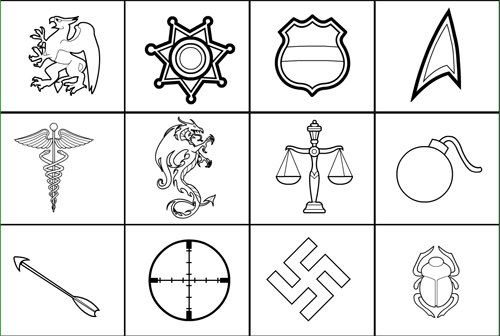
insignia-2

(Lots of suggestions from the comments are in the new set as well, including the crosshairs, the swastika, the bomb, the scales, the caduceus, and many more.)

I’m probably going to take a bit of a breather for the rest of the day, gather feedback, and then put out at least one more sub-set of Insignia if not more. I really liked Hakoon’s idea of labeling the runes Kalkin suggested in the actual preview box with the name of the rune. That’s pretty cool. So I’ll be knocking those out, and then probably doing at least one set of letters. If anyone has a super-cool font you want to point me at as a guide, I’ll take a look.

I want to also point out how flexible these insignia items are with all of your transformation tools and the use of multiples. For instance, the last two items are a Union Jack and the US Stars and Bars. The careful observer will note that each of those flags has three colors — red, white, and blue — and yet HeroMachine only allows for two colors. If you want to have an authentic-looking flag, therefore, you’re going to have to use multiples.

First, choose the square insignia, and make all three colors white. Scale it into a rectangle, longer than it is tall, like a flag. Make sure the “Multiples” selection is on and pick one of the flags, and make the first color red (or blue, I can’t remember which is which), and vice versa for the other color. Size it so it fits onto your white square, allowing the white bits to show through the stripes and stars I left transparent, and you’ve got yourself a flag.

As just one more example, in HM2.5 I had an Insignia that consisted of an archer on top of a circle. You’ll notice that in this new 3.0 set the shooter is alone, with no circle. That’s because you can choose the circle Insignia, set multiples to on, then choose the archer and layer him on top. This allows you to recreate the same logo with up to four different colors, while still giving you the flexibility to have a square shape behind him instead, or a triangle, or whatever you like.

Finally, whenever I get to the ItemRight/Left-Shield set, you’ll be able to use any of these Insignia as the boss on a shield. Or to decorate a tabard, or a piece of chest armor. The possibilities are endless.

I hope you like the new options and artwork, let me know if there’s something missing (besides what I mentioned above — runes and letters) that you just have to have and I’ll see what I can do. Oh, I also want to do a “Flags” set to include the Confederate stars and bars, that was a good idea that I just couldn’t fit in. The file started acting really funny at 97 items, I couldn’t actually click on them any more and had to finagle my way around, so this is pretty much the cap on the total number of items I can have.
HM3: Show me a sign!

Or an insignia would be even better, actually. I’ll start on Insignia-Standard tomorrow, so if you have any special requests, let me know in the comments below. I’ll of course be making every effort to convert over all the 2.x Insignia, plus a whole bunch more in the spirit of what you’ve seen already.

I realized earlier that I’m starting to get perilously close to having all the planned Slots filled with a set of Standard items. According to my rough working draft, the remaining unfilled Slots are:

  • Insignia
  • Companion
  • Belt
  • Facial Hair

Can you think of any slots I am leaving out? There are some pretty hefty sub-sets, of course, including a bunch of environmental/setting ones for Background (bits and pieces of scenery like chairs, desks, doors, wall dividers, text boxes for character names and/or headers like in a comic book, etc.). But if I am missing any big, glaring areas that merit their own Slot but don’t have one, by all means let me know.

HM3: Hair of the dog

I’ve just updated the HeroMachine 3 Alpha with a new “Standard” set for the “Hair” slot, replacing the former “HairMaleStandard”. All of the items that used to be in the old one are in the new one too, starting on preview page three, I think it is.

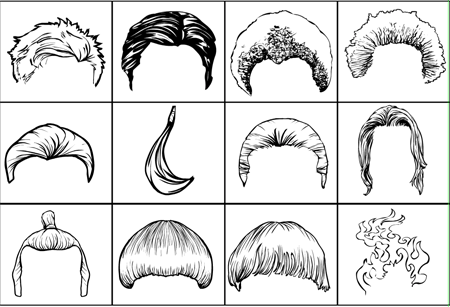
The new set has a total of 71 different hair styles and pieces, hopefully giving you everything you need to customize your character to the tee. Here’s a set of twelve to whet your appetite, but by all means check out the live set available now:

hairstyles

Let me know in the comments if there are any styles you were really hoping for that didn’t make it, or if there are any changes you’d like to see made. Thanks for all of your earlier suggestions, they were very helpful in putting the group together!

HM3: Backgrounds and gradients

I’ve just uploaded the first set of Background items, “Shapes”, to the HeroMachine 3 Alpha. I’ve included 21 different backgrounds for you in this set, which is a lot more than the first 2.x Background-Standard group, including your basic rectangles, circles, triangles, Union Jack, concentric target circles, a yin yang symbol, etc.

In addition, the basic program now has six more “Pattern” options, to allow you to apply basic dark-to-light gradients from either the top, bottom, left, or right, as well as one goes from the center out and one that’s in a circle. They’re not perfect, but they do let you do some things you couldn’t before.

You might also play around with using this big giant Background Shapes to create some funky uniform elements, as well. Just move the Background item to the front using the “To Top Layer” button in the Transform tab. Hit the Mask button, and click on the basic Body. This works particularly well with the Background Shapes that have gradients built in, especially if you set both of its colors to 0% Alpha — it removes the colors so the underlying Body can show through, but leaves the gradient, so you get a cool effect.

Enjoy!

Calling all stylists

I’m going to start on hairstyles for HeroMachine 3 later today, but as you all have seen, I’m not great with hair. Probably a result of having been bald since I was seventeen, more or less. Anyway, if you have particular styles you want, or sites that feature the same, by all means let me know in comments.

Thanks in advance!

HM3: More blades

I’ve just uploaded “BladesTwo” to the HeroMachine 3 Alpha. This should do it for the blades, let me know if I missed anything big. I do still plan on the naginata (the samurai blade at the end of a pole), but in polearms.

What would you like me to work on next? I’m thinking either Hair or Insignia but holler if you think something else ought to have priority.

HM3: Blades, and I don't mean Wesley Snipes movies

I’ve just released the ItemRight-Blades to the HeroMachine 3 Alpha. Note that this is part one of two sets of Bladed items; once I got to 72 entries, the file was getting to be too slow to work with easily. So starting tomorrow I’ll be working on “Blades2”, as I am only halfway through the HM2.x cutting implements and haven’t gotten much into the user-submitted stuff. Breaking everything into four pieces is slow slogging and really balloons the file size.

To recap, you’ll see each item broken out into four pieces: the entire sword/dagger/whatever; just the hilt and pommel; just the crosspiece (what the heck is that called?!); and the blade. Basically this gives you a mini-HeroMachine “Weapon Maker” within the main application, because you can add the handle of a broadsword to a round katana crossguard and a greatsword blade. Or — and this is pretty neat — you can put a … ahem, an “energy based saber-like blade” onto a samurai sword base.

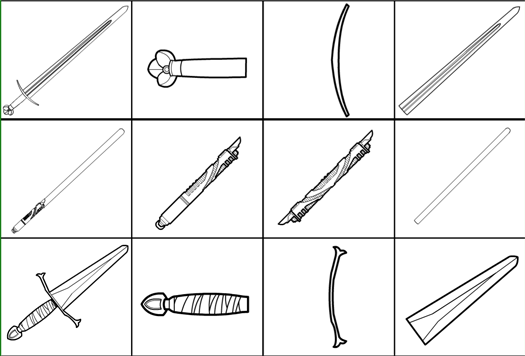
I know, cool, hunh?! Here’s one screen of previews showing some of the new entries:

blades1sample

In some cases there wasn’t really enough of a crossguard to warrant having it as a separate piece, but I wanted to keep to the “four items per design” thing going, so I threw in something else that fit. For instance with the colonial hatchet, I made a double-headed blade instead, and for the sickle I put in a spiked hand guard.

Let me know your thoughts on what I have so far, any changes you’d like to see made, any bladed items NOT currently in HM2.x that you want to make a pitch to include (Scorp, I still have all your suggestions on file), etc. I hope this works like I think it will and that you find it fun to play with …

HM3: Legwear Spandex updated

Just a quick note to let you know that LegwearMaleSpandex has been updated with items to match those in TopsMaleSpandex. They’re the four at the end. Enjoy!

HM3: Eyes and sharks

I forgot to mention it last night, but I added two shark items to the Heads-Animals set, a hammerhead and a Great White.

I just uploaded three new sets of pupil-less eyes to Eyes-Standard as well, to allow you to have solid color fills inside eyes, by request from the comments. That seemed to be a popular item so now you can go to town with it.

I’m about to start working on Legwear-Spandex to add the missing items from 2.x and to make sure they line up properly with the Tops, also by request. Once that’s done, I’ll start working on weapons, starting with swords. The plan there is to do them like I did the Tops, where you’ll have four separate items that comprise the completed sword. You’ll have the blade, the hilt, the handle/pommel, and finally the whole item with the three parts pre-assembled for ease of use. That’ll let you essentially make your own swords and daggers. Should be neat.

Thanks for all the feedback you’ve been giving, as you can see I’m reading it all and taking it in, even if I don’t respond to a specific request. Not everything can go into this first round of items, and not all of what’s left out will be in later updates, but an awful lot will. You’re directly affecting how HeroMachine 3 works, which I think is awesome. Go you!

HM3: The eyeless horde

I’ve updated Head-Animals, having dutifully removed the eyes from the poor critters contained therein. Shame on you people!

I couldn’t bear to take the eyes out of the two Eagles, the Owl, and the Tiger. They were just too good. I’ll bow to pressure if I must, but I defy you for now! ::shakes fist at the heavens::

It actually works pretty well. In a few cases, like the first Wolf, the eyes were the only color2, so I was able to reapply that somewhere else.

Tomorrow or the next day I’ll add in some animalistic Eyes, like cats and serpents and such.
