Category Archives: HeroMachine 3

HeroMachine 3 “Phoenix Edition” Progress Report

Can you tell I’m workshopping the name of this update? Anyway, I want to keep you all apprised of how the conversion process is going.

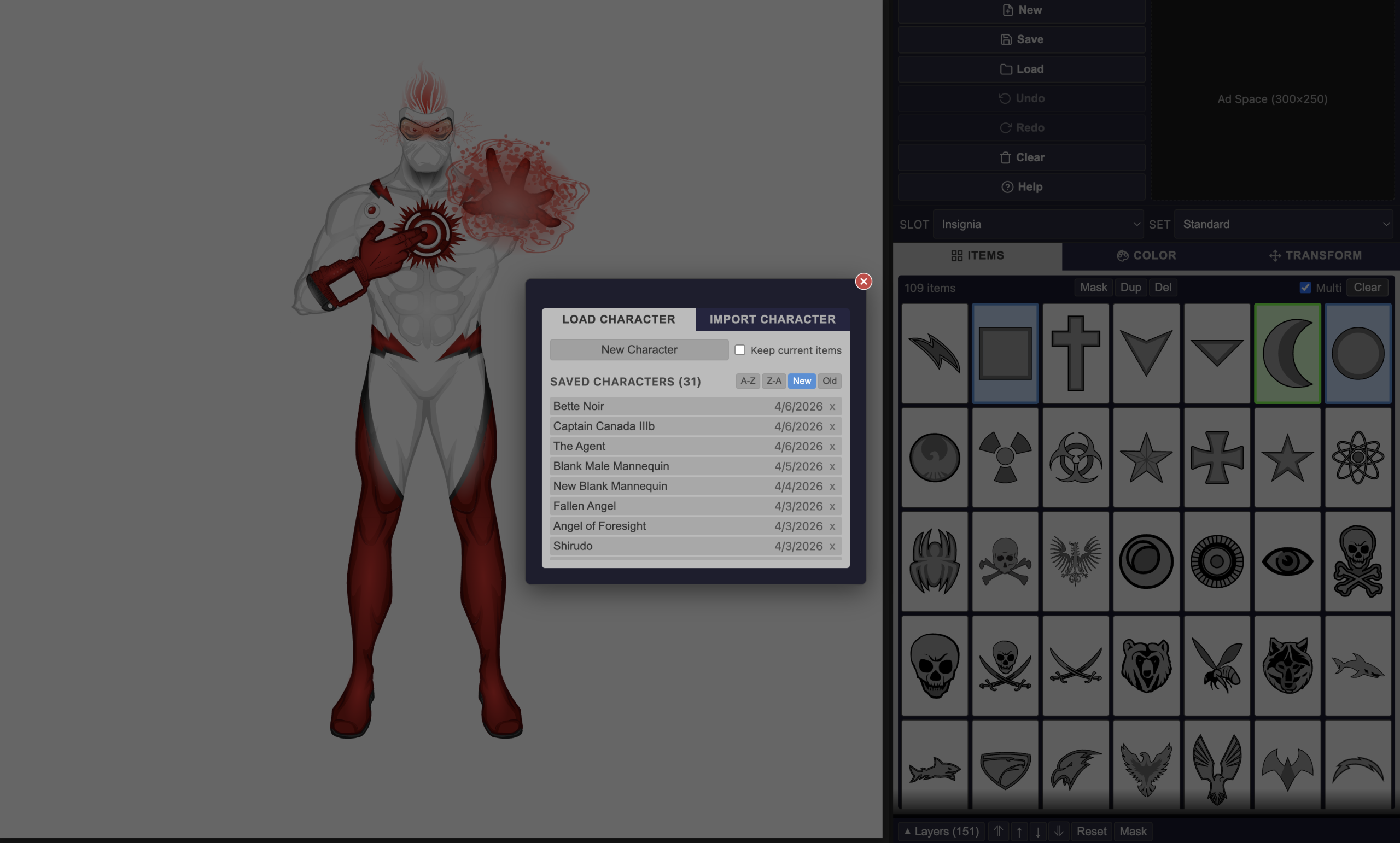
A screen shot showing the "Load" screen from the new HeroMachine 3 app.

You can now upload not just saved character strings but old Flash Cookie “.sol” files. For a long while that was the only way to save characters but it was tucked away in a hidden location that was hard to get to. Now if you have one from Back In The Day you can import it like any other file and all of your saved characters will be there, fully editable, without needing Flash at all. The test file I got from a long-time and awesome HeroMachine community member had 375 characters saved, and now they can all live again.

In addition I added an “Export All” button so you can keep your characters in a safe place outside of the site. I dread the thought of clearing your cookies and suddenly all your data is missing.

I’m also adding more new items under a central theme!

Continue reading

All roads lead to … new items?

I’m not sayin’. I’m just sayin’ …

The Return of HeroMachine 3?

After way too many years, I can hardly believe that the return of HeroMachine 3 as a non-Flash, fully-functional character creator is not just very real, but quite imminent. Here’s a proof-of-life screenshot:

Continue reading

How to Use HeroMachine 2 Locally

[Note: As of April, 2026 you can use HeroMachine 3 natively in your browser, no extra setup needed. If you prefer to use the Flash version, though, this article still applies.]

Hi all, with big thanks to HeroMachiner Eric Bowling, here’s how you can use HeroMachine outside of your browser. Adobe has said they’re going to be force uninstalling the Flash Player (the standalone player basically) but I don’t know that applies to this particular version.

Basically you download a local Flash Player application, then put in the URL for a .swf file (a compiled Flash object, which is what HeroMachine uses) and it plays. I’ve tried it on my Mac with HM3 and HM2 and it seems to work like a champ. You’ll still need an Internet connection but if this goes well I may bundle up the files and make them available online so you could truly run it all locally. We’ll just have to see, I don’t want to sell people something and then BAM Adobe force uninstalls the Flash Players and it no longer works.

Continue reading

Flash End of Life and maybe HeroMachine as well

Update: Check this post for instructions on how to keep using HeroMachine in a local Flash Player Debugger.

Flash has reached its End of Life and HeroMachine no longer works. Thank you for your support over the years and for your interest.

I have paid thousands of dollars and worked for 2+ years for a replacement but alas, it is not yet done. I’ve investigated replacements for Flash that would allow it to remain operational, but they haven’t worked out.

We’ll continue to work behind the scenes to see if we can complete the work that’s been done so far but clearly, my promises are worth very little right now. I’m devastated and so sorry that we weren’t able to bring this thing in for a landing in time.

I’m proud that for 20+ years, this site has enabled people to bring their inner creativity to life. I feel like I’ve lost a bit of my soul today and I am so, so sorry to have let you all down.

Check back occasionally and / or join the Facebook group (https://www.facebook.com/HeroMachine/) for any future updates.

All the best, and please keep on creating.

Jeff

Flash Support is Ending but HeroMachine Is NOT!

Hi folks! It’s been a while since I posted anything, but since hardly a day goes by without someone asking me what the future of HeroMachine is given that support for Flash (the software HeroMachine is built with) will be ending in 2020, I thought I should give you an update.

This year I have been working with Ben, the developer who helped with the site migration a number of years ago, on a non-Flash version of HeroMachine 3 built with Javascript and PHP instead of Flash. Once complete, this version should work on all devices and browsers without needing Flash at all, including (in theory) iOS so you can Machine on the go.

We have a ways to go yet, but Lord willing and the creek don’t rise, I hope to have something to show you all next month.

As for what will happen with older HeroMachine versions, I honestly don’t have an answer yet. I don’t plan on making a non-Flash version of those, though my hope is that someone will have a “non official” Flash player plugin available at some point that you can use in a browser so they’ll just keep working. We’ll see.

Thanks for sticking with me and best of luck in all your creative endeavors!

Heromachine Tutorials with Suleman

Heromachine 3: Design choices, starring Apatite

This is a little piece on how I personally make choices in character design, using my latest Heromachine thing, Apatite, as an example. I’m not a professional and these are only my uneducated opinions, but maybe they can help you as well?

Continue reading

HM3: Hey, bud! Would ya like to buy some leftovers?!

Starting my spring clean next weekend, I need to throw out some old stuff and I thought you might be interested in them. Here’s what I have to offer:
01_04_2016
(As usual it’s strongly recommended to clear your browser cache to see the new items – but be careful when doing so, since you could be loosing all your saved files. Better if you save those externally as text files beforehand.)

Creators Club 2016

Hi guys, JR here with the formal announcement of this years Creators Club Poster.

This years poster is being done by Stulte and the theme is Magic. So what you guys need to do is create a self portrait of yourself, either realistic or idealised, as some form of Fantasy based magic user, be it Witch, Wizard, Mage or other. You can show magic use if you wish and use poses other than the standard base pose, however we must insist on a few things. 1. The character must be forward facing, 2. Faces must be visible, so no masks or face coverings please, and 3. No backgrounds. Shading is optional, so you don’t have to shade if you don’t want to. And obviously all entries must be full-body pictures.

Of course, as with all previous CCP’s, for your entry to be acceptable you must complete the following criteria. If you don’t then you don’t get on the poster.

1. Your entry must be in .png format. You must title it in standard contest entry style i.e. Username- Creators Club Poster (for example I would title mine JR19759- Creators Club Poster). Don’t screenshot the picture and send that in, export it as a .png please.

2. You MUST include the text for your entry. Mandatory. This is incase Stulte needs to re-export any of the files in a bigger or smaller format. You can include it as an attachment in the email or just paste it into the email, but you have to have the text accessible.

3. Your email has to be titled something applicable to the Creators Club, so its easy to recognise as not-spam.

4. You only have one entry, so make sure you’re happy with it before you send it in. It doesn’t have to be the worlds best creation, this is only for fun after all, but we don’t want endless revisions.

After you’ve done that, send your entry to Stulte at creatorsclub2016@gmail.com . Submissions will be open until Feb 1st as of today, so you’ve got a whole month to do your entries, just don’t leave it to the last minute and not give yourself enough time. This is open to everyone, so you don’t have to be especially prolific or a Power User or anything, just a part of the community. And remember, this isn’t a challenge or anything, so just have fun with it.

If you have any questions, just leave them in the comments and Stulte and myself will try to answer them as best we can. If Stulte has anything else to add, I’m sure he’ll do so in the comments as well. But with that, I look forward to seeing what everyone comes up with.

JR out.

Creators Club 2016 Volunteers?

Hey guys, JR here. As with this year, I’m now looking for someone to do next years Creators Club Poster, starting in January and hopefully being finished in February.

For those of you who aren’t in the know, the Creators Club poster is a community project where one of the members of the community (previously myself, MadJack Atomic Punk and Hammerknight) have come up with a theme for everyone to follow (Superheroes, Men In Black, Chibi’s and Westerns), and then people create a self-portrait of themselves fitting to that theme. All of the self-portraits are then sent to the organiser, who then puts them all together in one big poster that showcases the community that year. It’s not a challenge, it’s just a bit of fun, you don’t have to be a Power User to participate, you just have to use the site and follow the submission rules for the poster.

Now, obviously, we’re trying to get new people to do these each year, so if you would like to volunteer and you have an idea for a theme, email it to me at the usual address (it’s in my About section at the bottom of the post).

Oh, and you don’t have to try and make it better than MadJack’s was last year, so don’t worry if you don’t think you can. MJ went above and beyond last year and I don’t expect anyone to do that sort of craziness again.

Previous CCP’s

2015

2014

2013

2011

Don’t ask me what happened to 2012.