Category Archives: HeroMachine 3

HM3 New Layout Test

If you’re feeling particularly brave, you might check out the new layout I’ve been coding for HeroMachine 3. It’s based on the excellent work of Mark Shute, who did a wonderful usability test for me a while back, and Jim Marcus of LiquidCrack.com who actually designed the whole thing (which I posted about in September). BIG thanks to both of those guys!

Here are a couple of screen grabs for those of you who can’t or don’t want to visit the live preview directly:
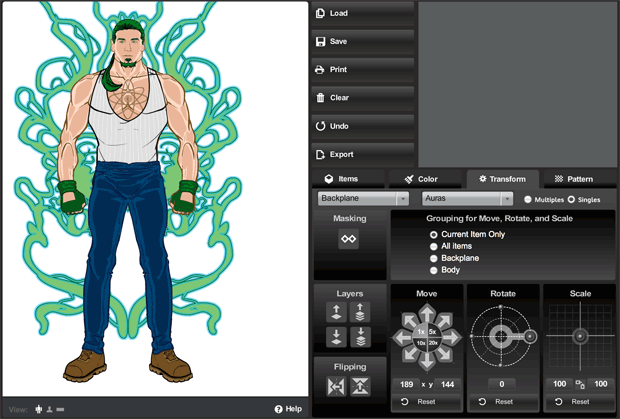
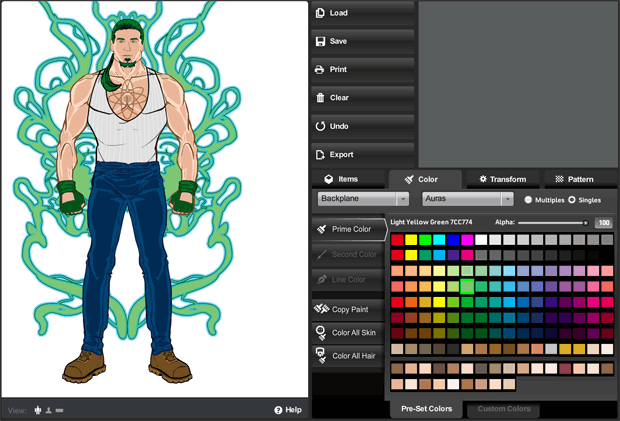
As you can see, it’s a lot slicker and more modern. The old gold and brown color scheme and layout were always intended as nothing more than placeholders for whatever design we ultimately settled on. And it’s certainly possible that at the end of the day, UGO will have their in-house design team do something different altogether.

In addition to the look-and-feel update, I’ve also moved some buttons around in an effort to group like-functions together more clearly and to make the initial user interface cleaner and less confusing. To that end I’ve moved the “Color All Skin/Hair” buttons to the new unified Color tab. I moved the “Flip” and “Mask” buttons to the Transform tab. I removed the “outline” feature since no one ever seems to use it, and it didn’t really work like I’d hoped.

I also added a few new features. For instance, you can now flip items vertically in addition to flipping them horizontally. Not sure how useful that’ll be, but it’s fun! I removed the “arrow action” buttons that were intended to be what you’d click to make the manual entries for alpha, location, rotation, and scale take effect, but which were rarely understood or used. Instead, you now just enter your value and either tab out of the box, or click on some other part of the screen, or hit ENTER, and whatever you typed in there will be implemented.

I also updated some of the more irritating text box limitations. For instance you can now manually enter a location figure up to 1000 if you want (note that this would put the item completely off-screen). And you can now enter negative numbers in the Rotate box.

Please give it a look-see and let me know what you think, any major bugs you find that weren’t there before, good and bad on the layout or control locations or really anything else you can think of. Thanks in advance for your feedback!
HM3: Undo tweak

I just updated the HeroMachine 3 alpha to A.20, which adds a cap of 20 actions to the number of undo levels. If that’s not enough, let me know — it’s easy enough to change.

If you have more than 20 saved characters, I’d strongly encourage you to make a backup of your hmcharacters.sol file before you do too much today. This shouldn’t impact the save file at all, but … yeah, it makes me nervous, too. Better safe than sorry.

Hopefully this will stop the irritating Flash pop-up asking how much file space you want. Although, if you see that, just right-click on the HeroMachine app, choose “Settings” from the flyout, click the little folder icon, then set the file size to the next level up. 1MB usually works. You can check the “Don’t bother me again” box if you want as well.

But like I said, hopefully this will stop it from being an issue at all.

HM3 Undo feature now live

I’ve updated the main HeroMachine 3 Alpha application to incorporate the “Undo” feature I mentioned yesterday. Testing has revealed it doesn’t cause the Apocalypse, so we’re good to go. Please let me know if you have any issues with this release.

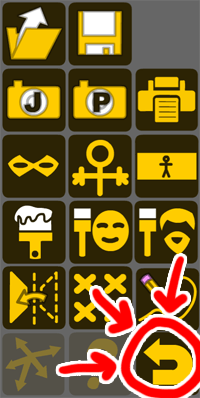
For those who missed the post yesterday, this is the new “Undo” button:

It’ll undo until there’s nothing else to undo. Color changes, scaling, rotation, moving an item with either the mouse or the transform buttons, alpha changes, deletions, additions, “color all skin/hair”, “Clear All”, you name it, you can probably undo it, except for transformations using the “All Items” grouping, since I’ll be changing how that works in the relatively near future.

Hope you like it!

HM3: Undo testing

I’ve posted a test version of HeroMachine 3 here featuring the first pass at the “undo” feature for those brave enough to give it a whirl. This test version shouldn’t affect your “real” saved characters at all, they’re totally separate files. But caveat emptor and all that.

It’s pretty much what it sounds like — do stuff and if you don’t like how it turns out, click the “Undo” button:

It’ll undo until there’s nothing else to undo. Color changes, scaling, rotation, moving an item with either the mouse or the transform buttons, alpha changes, deletions, additions, “color all skin/hair”, “Clear All”, you name it, you can probably undo it.

Currently there is no limit on how many “levels” of undo there are, but I’ll probably need to cap it at some point.

If you’ve a penchant for life on the edge, I’d appreciate your trying it out and letting me know how it works for you. Hopefully we can work out the bugs in this and then, when it’s ready, make it the “real” HM3 alpha for everyone to use. I particularly want to make sure it doesn’t mess up saving and loading of characters, so if you can check that out that would be great.

Edited to Add: I’ll be taking down the “C” test version from a few weeks ago in a few hours, so if there’s anything you wanted from it, you better get it asap.

HM3: Wherein bugs are squashed and a question asked

With thanks to Panner and MMI, I’ve just updated the HeroMachine 3 Alpha with some more bug fixes:

  • The alpha transparency settings for all colors (especially color2) should now be working properly when you add additional items.
  • You can now switch on “Multiples”, add two of the same item, switch to “Single”, add a different item, and the previous items will correctly be removed without giving you “stuck” objects.
  • You can now drag items with the mouse wherever you want, even off-screen. Previously you were limited to dragging items only within the composition window.

Thanks to both of those folks for their excellent troubleshooting and bug reporting, it made squashing the bugs much much easier.

My question for you all regards automatic masking.

Currently, let’s say you have one item (for example, a square insignia) masked to another (like a body). Here’s how that looks:

But then you decide you want to add a second item from the same slot. In our example let’s say we wanted to add the chevron insignia. We select “Multiples” in Insignia, then click the chevron. The old item, the square, becomes UNmasked from the body, and the new item, the chevron gets masked instead, like this:

The question is, when you add a second item from a given slot (like the chevron insignia), would you prefer that the masking on the previous item (the square insignia) stay applied? Or would you prefer to keep it like it is now, where masking transfers to the new item along with colors and such and the old item is unmasked?

HM3: The name’s the thing

When you save your character image in HeroMachine 3, it will now have the name of your character (if any) as the default file name instead of “hm3-beta”. The name comes from the last character you saved or loaded.

Note that this is preparation for the long-awaited “quick save” and “undo” features, the next major code change initiative. Woot!

HM3: Bug tweaks for layering

I just posted a minor update to HeroMachine3 that hopefully will fix some of the layering and “stuck item” problems people were having when loading up saved characters.

I’ll explain the nitty gritty after the jump for those who are interested.

Continue reading

HM3: Transparent PNG

I’ve just added a third format option when exporting your character’s image in HM3 — “PNG (transparent 400×600)”. This is basically just adding in an option for the way it used to be.

When you click it, the size gets reset to 400×600, the Area gets reset to “Character”, and all other options are grayed out since you can’t make any of the other sizes or head shots export with transparency. Choosing regular old PNG or JPG turns them all back on, though.

This should help those, like DiCicatriz, who use the characters with transparent backgrounds to paste into an image editor for either larger group shots, or just to have in a custom setting.

Let me know if you run into any problems using it. All other options will continue to export with a white background.

HM3 Export options updated

I have very good news, and mildly bad news. The very good news is that I have just uploaded the latest update to the HeroMachine Alpha that allows you to output your creation at a wide variety of sizes, either as the full character or a portrait view, as a JPG or PNG, and in regular or widescreen format.

The mildly bad news is, saving as a PNG no longer puts your character on a transparent background — it’s a solid white. I tried to figure out a way around it, but given the various other constraints Flash put on me it was the only way to get output at anything but the basic size.

Here is the new menu, which you see now when you press either the “Save as JPG” or “Save as PNG” button:

If you have trouble seeing the images, the sizes are:

  • 200×300
  • 400×600
  • 500×750
  • 800×1200
  • 1200×1800
  • 1600×2400
  • 800×600 (widescreen)
  • 1280×1024 (widescreen)
  • 1600×1200 (widescreen)
  • 2048×1536 (widescreen)

My version of Flash has a maximum dimension limitation of something like 2800 pixels, so we couldn’t do the ridiculously ginormous size, just the mostly ginormous ones.

In laying all this out it didn’t make sense to have “widescreen” be a separate toggle button, so now the program just automatically does it all for you depending on which set of dimensions you choose.

I hope you like the new feature, and please let me know if you run into any problems with it. The larger sizes naturally take longer to render, so don’t be surprised if the pop up window just sits there for ten to thirty seconds thinking.

I didn’t touch the save/load code or anything else in this release except the export functions.

HM3: Oops

Much to my dismay I have just discovered that at least one of the major changes I made to HeroMachine 3 got lost somewhere in the file confusion I had a couple of days ago. I haven’t had the heart to check and see just how much of the bug fixing was destroyed. The backup I thought I had turned out to not be a backup, too. If I have to rewrite all the stuff I did last week … man, I might have to cry.

In the morning when I am feeling better I will look into it further, but that’s why all of a sudden things started coming up in the wrong slot, layers were hosed up, etc. It’s because only some of the fixes turned out to be in the version I uploaded. I don’t know what happened … there was a weird episode where one of the working versions didn’t load, and I renamed and reloaded some backups, and then … I don’t know. Feh.

More to come tomorrow when I know more. This sucks. But hopefully I can get it fixed sooner rather than later.