This week’s Poll Position puts asks:
{democracy:54}
Discussion of the choices after the jump.

This week’s Poll Position puts asks:
Discussion of the choices after the jump.
Posted in Versus
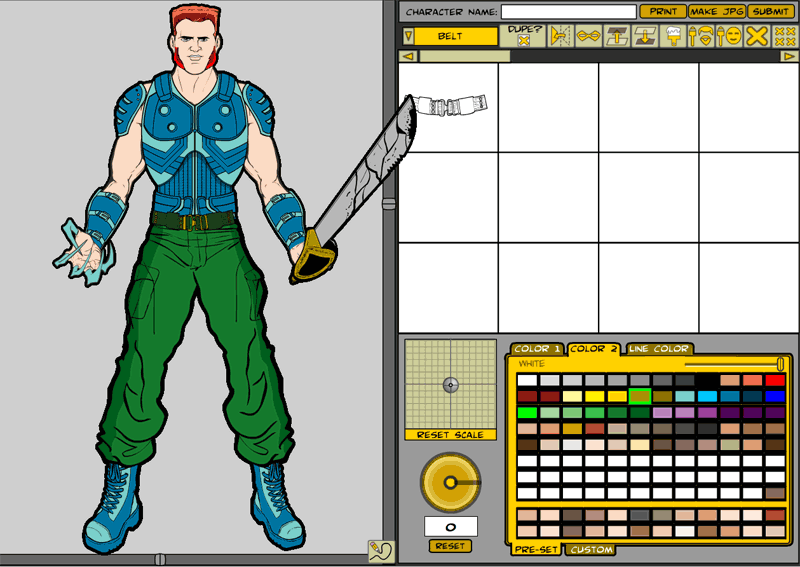
I took a moment during the coding and drawing and football watching (and fantasy losing) today to take a screen shot of the new HM Warrior Mini:
In the character design area, you can see one of the new sets of hands. I’ve also relayered the pants so they cover the boot tops, as someone pointed out in comments that the last version of this didn’t look right. I’ve added a new feature, launched with the little pencil icon at the bottom right corner of the character window, that outlines the figure and all the items in the image with black. I think it helps the illustration look more cohesive and really “pops”.
The control buttons in order are:
Lots of items and a few new features yet to come, but this is the progress to date.
Posted in Previews
I’ve been going crazy all morning, trying to figure out why two of the hands I drew don’t properly mask out the items you put in them. Basically what masking means is, I can define an area in one item (the hands) that blocks out part of another item (like guns), so it looks like the hand is actually gripping the gun instead of just being layered on top of it.
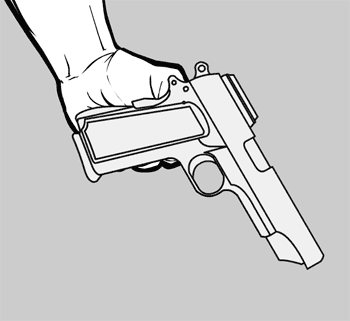
That’s a bit confusing, so I’ll show you what I mean. Here are the two items unmasked:
And here they are masked:
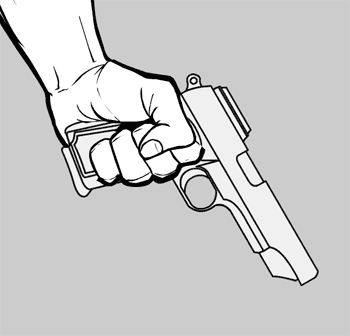
You can see the difference — in the second one, even though the gun is the same illustration as the gun in the first one, the handle gets blocked out by the fingers curling around. This is great because it lets me draw the entire hand-held item (i.e. the gun grip) and still use it in any kind of hand.
But this morning there were two hands that just refused to mask properly. No matter what I did, the proper parts of the gun type items didn’t get blocked, and I couldn’t figure out why. I tried recreating the mask object, I tried redrawing it, I tried renaming things, I tried deleting and starting over, I tried comparing the non-working ones to the working ones, and nothing made any damn sense at all.
I assume I am not the only programming type person to run into roadblocks like this, where nothing works and you don’t know why. I am probably more prone to it than most because I am, frankly, a hack when it comes to Flash (meaning I didn’t go through any formal training, I’m entirely self-taught). I keep running into holes in my education, and I never know if it’s something wrong with me or the program, or both.
This time, it turned out to be the program, and in an incredibly stupid and irritating way.
It turns out when you’re making a mask in Flash, which way you draw the lines matters. If you draw the mask shape clockwise, it all works fine. If you draw it counter-clockwise, though, it won’t work.
How freaking jacked-up is that?! I can’t imagine the Pope telling Michaelangelo “I like the parts of the Sistene Chapel ceiling you did with the brush strokes going left, but not the strokes going right. Change them all to match.”
I mean, I know in Physics there are left-handed and right-handed particles, but this is nuts.
Luckily a Google search turned up a page that held the solution in the comments, for which I am profoundly thankful. This ruined my whole morning and part of last night; it’s a really stupid bug, and I hate it, but at least now I know how to work around it. I never would’ve guessed the solution in a million years, though — thank goodness for Google!
Posted in Previews

Posted in Daily Random Panel
Here’s a first look at the hands I drew today for the HM Warrior Mini:
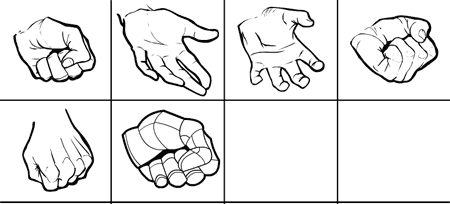
If you have any positions you think would work better, or if there are different sorts of hands you’d like, let me know in comments.
Posted in Previews
Some of these are combination melee and ranged weapons, but mostly they’re for hand-to-hand stuff. Hope you like ’em.
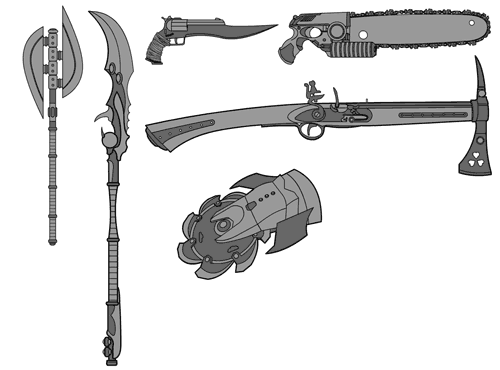
Posted in Previews

Posted in Daily Random Panel
“Hey, nice guns!” she said admiringly.
“Thanks!” I replied, flexing my biceps.
“No, idiot, the guns you spent all day drawing.”
So since she didn’t really want to look at my guns, I now inflict them on you. Flex flex.
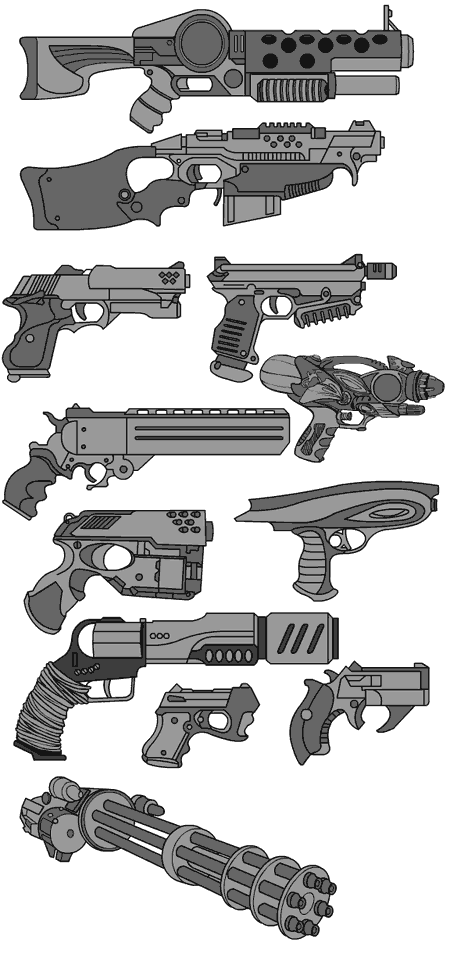
Posted in Previews
From the pages of “Elfquest” comes this profoundly disturbing image of a fairy splooging herself into a troll’s face, in what I think I can safely say is the first example I have ever seen in a mainstream comic of a reverse facial:
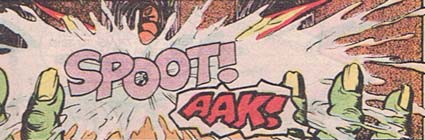
As artists, we’re often asked to come up with odd sound effect visuals, but I am pretty sure this one takes the cake. The next panel, where the troll has to wipe the sticky white goo off his face (I am not making this up) is almost as good, but doesn’t qualify as onomontoPOWia because there’s no actual sound effect. Still, in the interest of completeness for the historical record, here it is:
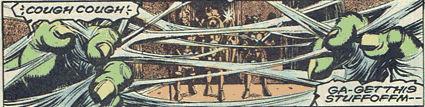
Hats off to the Pinis for breaking the prudery barrier with this bold gender reversal.
(image ©1988 WaRP Graphics., Elfquest, Vol. 2, No. 30.)
Posted in OnomontoPOWia

Comments Off on Random Panel: I think that's more of a "felony" than a "super power" fellah
Posted in Daily Random Panel
 Three middle-aged nerds (including yours truly!) review all of the MCU movies in chronological order. Short, funny, and full of good vibes, check it out and let us know what you think!
Nerdmudgeon.com
Three middle-aged nerds (including yours truly!) review all of the MCU movies in chronological order. Short, funny, and full of good vibes, check it out and let us know what you think!
Nerdmudgeon.com