Category Archives: Meta

META: FNF3

I’m working on getting the first “play-in” round for Friday Nights 3 assembled and posted. It’s a lot of work so it might be a little later in the day, but I wanted you to know it was coming. There are some fantastic entries in there, I promise it’ll be worth the wait!

META: Skipping Lone Wolf Today

Sorry folks, I’m on a roll drawing (just one more claimed prize to draw!) and want to focus on that today, so I’m going to skip this week’s installment of Lone Wolf. Plus, that story is kind of bogging down and I could use a break from it.

If you have ideas for other adventures or anything else we could do on RPG Thursdays, I’m open!

META: On mancation

Best bud and “Friend of HeroMachine” John Hartwell is in town and we’re headed up to Telluride today through Friday for unplugged Mancation time. That means I’ll have very limited Internet access, so your moderated comments will be more delayed than usual until I can get to a wi-fi spot to check in via the iTouch. I’ve also got our regularly scheduled features queued up and ready to go so it’ll be like I’m still here.

Be good to each other!

HM Facebook Page — Are you in?!

If you’re a Facebook user who hasn’t yet “liked” the HeroMachine Facebook page, you just missed out on a quick post and link to the new “Avengers” Captain America costume. You could be there, right now, trashing it! Get busy!

META: How to post images from various sources

When you’re posting an image of your character to this blog (like for a contest), please post a link directly to your image and not to a jump page. Here’s how you do that for the various services.

ImageShack

To the right of your ImageShack image is this box, titled “Links to Share This Image”:

You want to use the URL in the “Direct Link” box. You do NOT want to use the URL from your browser’s address bar. The former takes you to the image and only the image, while the latter loads up all the ImageShack stuff that goes around it.

Good: http://img4.imageshack.us/img4/6329/leomm.jpg (From the “Direct Link” box in “Links to Share This Image” box.) 
Bad: http://imageshack.us/photo/my-images/4/leomm.jpg/# (From the browser URL)
Bad: http://imageshack.us/photo/my-images/4/leomm.jpg/ (From the “Link” box in “Links to Share This Image” box.)


PhotoBucket

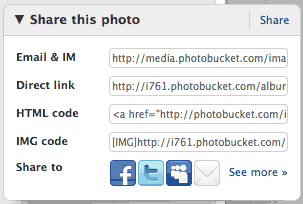
To the right of your PhotoBucket image is a box labeled “Share this photo”:

You want the link from the box labeled “Direct Link”, not the one from the browser’s address bar or the one from the box labeled “Email and IM”. The former takes you to the image and only the image, while the latter loads up all the PhotoBucket stuff that goes around it.

Good: http://i761.photobucket.com/albums/xx260/hastur1/Hero_Machine/cavalier.jpg (From the “Direct Link” box.)
Bad: http://media.photobucket.com/image/heromachine/hastur1/Hero_Machine/cavalier.jpg?o=189 (From the browser’s address bar.)
Bad: http://media.photobucket.com/image/heromachine/hastur1/Hero_Machine/cavalier.jpg?o=189 (From the box labeled “Email and IM”.)


PicasaWeb

PicasaWeb is not one of the preferred image hosts for this site. However, if you want to use it, please right-click on the image and choose “Copy Image URL” from the flyout menu:

Good: https://lh3.googleusercontent.com/-HkpI-oBLspE/ThzQBQMpO3I/AAAAAAAADx8/52YwBH9XzKk/%25255BUNSET%25255D.jpg (From right-clicking the image and choosing “Copy Image URL” from the flyout.)
Bad: https://picasaweb.google.com/110582698825637617540/Illustrations?authkey=Gv1sRgCLea29PPkPPaxwE#5628602354252725106 (From the browser’s address bar.)
Bad: https://picasaweb.google.com/lh/photo/8-no1oyz2HnpccqCZQzfCg0SVwt_GzEs7LqBcwS4Hj4?feat=directlink (From the “Link to this photo” box over on the right side.)


Facebook

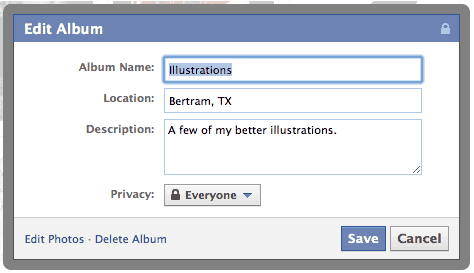
Facebook is the least preferred image host for this site. However, if you have to use it, make sure you set the image’s properties to “public” or else I can’t see it no matter what you do. To do that, edit the album you’re going to use for your HeroMachine images and choose “Edit Album”. In the dropdown labeled “Privacy”, choose “Everyone” like this:

Since in February Facebook instituted their new JavaScript photo scroller, I can’t figure out how to get a direct link. I know AJW still uses the direct method, so if you’re willing to chime in via comments on how you do it, I’d appreciate it.

Deviant Art

Deviant Art is the home to a lot of mature illustrators. When looking at your image, in the right hand column is this set of links:

Right-click on the “Download Image” link, and choose “Copy Link Location” or “Copy Target Link”, however it shows in the popup menu.

META: Continuing issues

So the site is still having problems. My latest gambit is to throw kinetically-charged playing cards at it. Ha ha, that’s a Cajun mutant joke because I’m a Cajun and there’s this mutant named Gambit and … ahem. Clearly I am becoming unhinged.

As I was saying, my latest gambit was to turn off a number of WordPress plugins. We’ll see if that helps.

In the meantime, you can keep up with all things HeroMachine via the HeroMachine Facebook page if you’re so inclined. Even if the site itself is down, I post updates there about what’s going on.

Thank you all for your patience, I know it’s frustrating.

META: Site slowdowns

Over the last week, this site’s been having some connectivity issues. In an effort to track down why, I’ve made some back-end changes, disabled the rotating “Featured Character” box in the header, and essentially removed the “Hall of Fame” page for now. If any of that helps, I’ll add them back one by one to see which is causing the problems.

Basically the hosting company is telling me that some scripts were taking too much processor time and so were shutting down access to the page. Since the latter two scripts are the only ones I’ve added recently, I’m figuring they’re probably the culprits, but we’ll see.

META: Holdups

New posts (including the contest results and new contest announcement) will be delayed. Hopefully we can get the outstanding issue resolved quickly and normal posting will resume sooner rather than later.

I don’t have any answers and I can’t explain things any further, so I’ve disabled comments on this post. When I know something definitive, I’ll update you.

ETA: Obviously, the problem was resolved and normal posting has resumed. Huzzah!

META: Hall of Fame

I have always been frustrated with my inability to get a proper “Hall of Fame” type of page going where you could see all sorts of awesome characters in one place.

As of today, that frustration is history! If you click on the teaser ad up there in the banner labeled “Featured Character”, you will now be taken to the HeroMachine Hall of Fame.

Plus, that little widget is now randomized, so every time the page is reloaded you should see a new character featured there. Neat, hunh?!

META: Save issues?

I’ve heard disturbing reports from AMS, Hammerknight, and a couple of other folks that after a Flash update, they lost all their saved files and now can no longer save characters between sessions. Has anything like that happened to you? If so, could you please post in comments with your browser version, operating system version, and Flash version (which you get by right-clicking on the HM3 app and choosing “About Flash Player” from the flyout)?

I’m really hoping Adobe didn’t change something about the way they save Flash cookies in this latest release …

This is a good time to remind you that, as with any piece of software, you should back up your characters on a regular basis to avoid catastrophic loss. There are now three ways to do so:

  1. Save the text string of your character to a file using the “Save as Text” option in HM3 and pasting the results into Notepad or Text Edit or Word or an email or whatever you like. This is the most secure.
  2. Find the hmcharacters.sol file on your hard drive and copy it into a directory you control. You can also make a backup copy of the .SOL files that Flash uses to save your guys. I’ll probably keep the old (current) alpha version “live” for a little while under another name (so heromacine3a.swf or something). If I do that, then you should be able to go in and change the directory name where these .SOL files are kept to that name and still be able to access your characters:

    The saved Flash shared object library files (.sol for you Windows users) are LIKE cookies, but they are NOT actual cookies. They are not stored in the shared internet data files and will not be deleted if you erase all your cookies. You can only remove them by right-clicking on the movie, and going to Flash Settings, removing them there.

    In Windows it’s at %AppData%MacromediaFlash Player#SharedObjects\www.heromachine.comhm3 where %AppData% is a variable leading to your browser.

    On a Mac they are in HD / User / / Library / Preferences / Macromedia / Flash Player / #SharedObjects / / https://www.heromachine.com / hm3 / heromachine3.swf / hmcharacters.sol

  3. Export your images as JPGs or PNGs. This doesn’t enable you to live-edit them any more, but at least you’ll have the images.

I hate to think of people losing their hard work, and I’m trying to do a bit of digging to see if anything changed with the latest Flash Player update or what.

Edited To Add: Sure enough, Adobe has implemented much easier methods of deleting “Flash cookies”, which is what the HeroMachine save file is. You can get the details here. AMS identified the specific setting you need to change if you don’t want all of your saved characters to be wiped out the next time you close your browser after installing the update, at least in Internet Explorer: