
Category Archives: HeroMachine 3

HM3 Journal: Duplicity

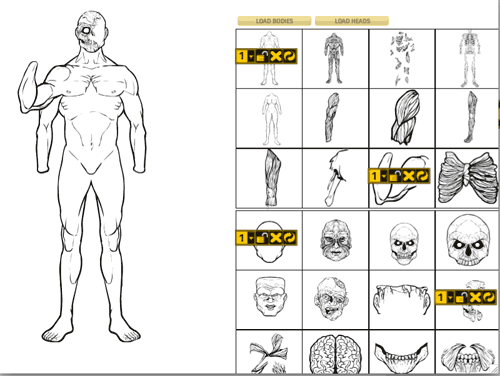
The biggest challenge so far in designing HeroMachine 3 has been how to let the user control multiple items in the same slot, particularly multiple examples of the same item in that slot. For instance, if you want three Colt .45’s on the character, trying to present the controls for them in an intuitive way is hard. Today I’ve been working on how that might work, and I have a screen shot of the simple test movie:
itemtools-sample

The idea here is that when you click on an item to add it to your character, a tool bar gets added to that item’s preview box. At a glance, then, you can tell which items are loaded and which are not, which is a deficiency in the current round of Minis. The first item in the new item tool bar is a number with a little drop-down arrow next to it. The idea on this is that if you have the aforementioned three Colt .45s loaded, clicking on the dropdown will cycle through each one in order, from 1 to 2 to 3 and then back to 1. I would probably add something that would briefly highlight the actual item on the character, too, so you know which number goes with which of the guns.

The next button on the tool bar is a lock/unlock toggle. Clicking that will lock the current item so it doesn’t get removed when you add another item from that slot.

Next comes the Delete Item button, which would remove that item from the character (and the toolbar from the preview box, so you know that item’s not loaded any more).

Finally you have the Reset button, which will return the item in question to the default rotation, scale, and colors.

The “Dupe” button would go away in this scenario. I think it was confusing and non-intuitive to use, and hope that this new way — focusing on the items — might be easier.

What do you think?
HM3 Journal: It figures

I spent the latter half of last week finishing up client change requests on the “Horror Mini” (you remember, the one that was supposed to come out at the beginning of December? Yeah, right) and the Zombie Mini, both of which I think are finally Done with a capital D. I think. Hope.

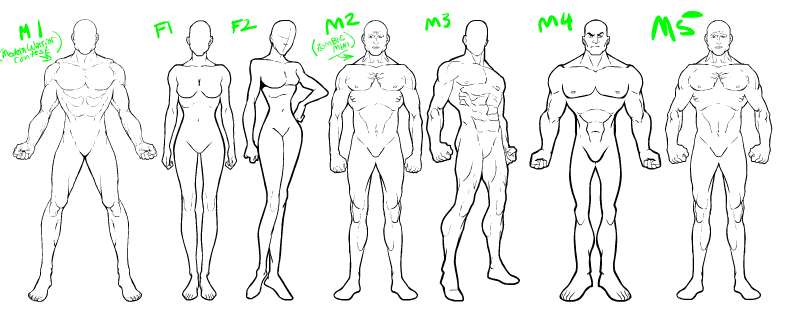
So the last two days or so have been spent thinking more about HeroMachine 3, and drawing out some figures. I’m a bit torn on this score, as I have the sneaking suspicion that the art style I’m using sucks. It’s hard to say from the inside, because I don’t know if there’s a moment when you as a creative person think “OK, this is my style, that’s how I’m doing it from here on out.” It seems more organic than that to me, that you just sort of fly along, doing what you do, and eventually you look back and realize you could pick out something you drew from a thousand other pieces, not just because you know you drew it but because it looks like you somehow. And wham, there’s your style.

I’m not there, not by a long shot. I think the basic figure of the Minis is decent, and I like the stuff I’m doing as the prizes for the Caption Contests, but I still (at almost 40 years of age, blegh!) don’t feel like I’ve figured out yet how I draw.

It’s like this. When I look at the Her-O-Matic, everything in it is very tight and cohesive. And that’s because he is using Bruce Timm’s style, which is very well thought-out and meticulous in its adherence to its own rules. As any animated series must be, when you’re relying on hundreds of people overseas who don’t even speak the same language you do to draw all those thousands of cels. You have to have your art direction absolutely rock-solid, and it definitely shows in all of Timm’s DC Animated Universe stuff.

So when you look at output from the Her-O-Matic, you know in an instant what you’re looking at. And it works. It’s absolutely a cohesive illustration.

I don’t have that, certainly not in HeroMachine 2, which isn’t surprising given that it consists of artwork strung out over the course of almost ten years. Given the (let’s be honest) not very good figures the whole thing is based on, a lack of a satisfying portrait is unsurprising.

That’s one of the things I’m most excited about for HM3 and with the Minis, that I was getting to start from scratch and rework it all from the ground up. And I have to say, when I see the stuff people have come up with, it definitely looks a lot tighter than any previous version. I can’t wait till the Game Contest is over and I can see all the entries, but even just the ones in the gallery UGO put out were pretty nice looking.

Which is all a long, angst-ridden way to show the figures I’ve come up with so far for possible HM3 usage, and to ask if you’re happy with the artwork in the recent minis.

HM3 Journal: Day 4

I spent all morning finalizing the Zombifier applet for the client, and am waiting on one final bit of direction before that’s totally done. In the meantime I’ve been refining the basics of HeroMachine 3.

Continue reading

Slots and sets in HM3

Fabien asked a good question in the comments to the last post — what happened to Headgear and Masks? Discussion to follow the jump.

Continue reading

HM3 journal, Day 3

On Monday (Day 1 of the HeroMachine 3 development process), I finalized the slots and started researching how to load external movies (.swf files) into the main Flash application in Action Script 3. Yesterday I actually laid down sample code to do just that, and was able to load in sets of bodies and then heads from the Horror mini. I was then able to click on the previews for each item and load it onto the stage where I could drag it around and do all other sorts of nifty things to it.

That was the biggest programming challenge; now that I’ve settled that, I can move on to the rest of the coding. Today I am going to be starting work on the relatively complicated navigation system for choosing which slot you want to be working on, and which set of items within that slot you want. I also have to do a lot of the background stuff like deciding how to format the array holding all the slot variables, what properties to give them, conceptualize how they’ll all stack, etc.

After the jump I’ll put the list of slots, if you see anything missing that ought to be there, let me know. Like in the recent Minis, you’ll be able to add as many items in each Slot as you want.

Continue reading

HeroMachine 3.0 begins

Today I am officially starting on HeroMachine 3.0; I even created a folder for it on my hard drive, so you know it’s serious!

It will be built on the same code base as the recent Warrior and Horror Minis, meaning it will have all of those features (scalability, custom colors, line colors, movable items, rotation, transparency, multiple items in a slot) and more. During the discussion of those minis, I kept a list of feature requests that seemed like particularly good ideas, and I am listing them below. Take a look and let me know any other stuff you’d like to see HM3 have.

  • Magnifying glass zoom feature
  • Pre-set pose/body style buttons to recreate classic builds.
  • Preview mode.
  • “clone” button
  • On the scaling tool, a button “keep proportion” would be useful.
  • Pop up asking if you really want to delete ALL items.

I’ve still got some work to finish on both the Zombie Mini and the general Horror Mini but hopefully that’ll be done in the next two weeks, and can go on concurrently with the HM3 stuff.

I’m very excited, and I have high hopes that this will all come together very quickly!

What's old is new

I was going through some old sketch books yesterday, and came across some of the very first ideas I had for HeroMachine. What struck me was how similar they are to some of the knockoffs I’ve seen since then, and how some of the ideas back then may surface in HeroMachine 3. Since part of what I want to do with this blog is to include you in the process of developing a piece of software, I thought I should share those old drawings; here goes!

Continue reading

HeroMachine 3 Items

One of the members of the HeroMachine discussion group wrote the following suggestions for HeroMachine 3:

I have three suggestion for the HM 3
1- create a forhead component. Cool for jewel and other piercing but also for rhino or unicorn horns and for classi mask insignias.
2 – Separate belt in two components : the belt body and the buckle. It permit to create combos. You can introduce in hM3 stuff like metallic letters buckles or other symbol bucles and combinate that with all kind of belt.
3 – Patterning : Not just propose only color but also patterns. Those patterns must be color customisable, of course. It particulary interesting for components like undershirts, leggings and masks. But we can imagine different kinds of patterns and textures for each components. But i suppose it’s less manageable.

These are excellent suggestions. The patterning is already in the plan (such as it is), but I hadn’t thought about separating out buckles.

In my head, the basic idea behind HM3 will be that each spot on the body will have multiple sets of items you can load onto it. So for instance, among the slots available to place on the Torso would be four for shirts (Shirt Slot 1, Slot 2, Slot 3, and Slot 4). I’d have a bunch of separate files containing item sets that would fit any of those four slots, probably grouped into themes, like “Undershirts”, “Overshirts”, “Bandoliers”, “Capes”, etc. so it’s easy to find the items you want. But you could choose to load all four slots up with the Undershirt items if you wanted.

One of the key differentiators between HM1 and HM2 was that in HM1, if you wanted a particular body, you were stuck with whatever components and items were made for that body. So if you wanted a big brickish looking guy, you couldn’t get martial artist weapons, or if you wanted a melee warrior you couldn’t get firearms. HM2 did away with that limitation, so all items and all components were available on any body style. But you still are stuck with, for instance, only one Coat slot. If there are two Coats you want to layer on a character, you can’t. My goal with HM3 is to do away with that limitation, so that you can basically load any set of items you want into any component slot you want.

That raises some complications when it comes to masking — for instance, fitting a gun into a hand without the lines from the gun overlapping the lines of the hand. But that’s the general idea.
