
Home › Forums › The HeroMachine Art Gallery › HOW TO POST YOUR CHARACTER!
- This topic has 38 replies, 20 voices, and was last updated 10 years ago by
 Kaldath.

-
AuthorPosts
-
March 20, 2012 at 1:33 pm #167

KaldathKeymasterKaldath alerted me that there’s a bit of a problem with adding text files to your posts. After some digging, here’s the (admittedly awkward) way to do it. I have a suggestion in with Simple Press to make this easier, but for now, this is what we’ve got.
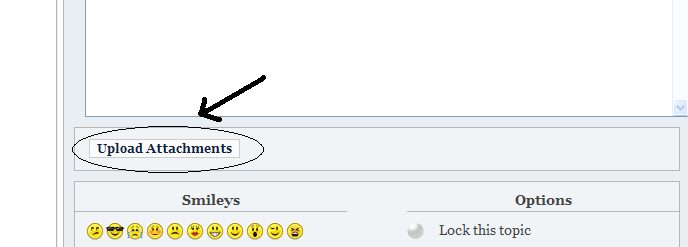
1. Click the “Upload Attachments” button while you’re writing your post.
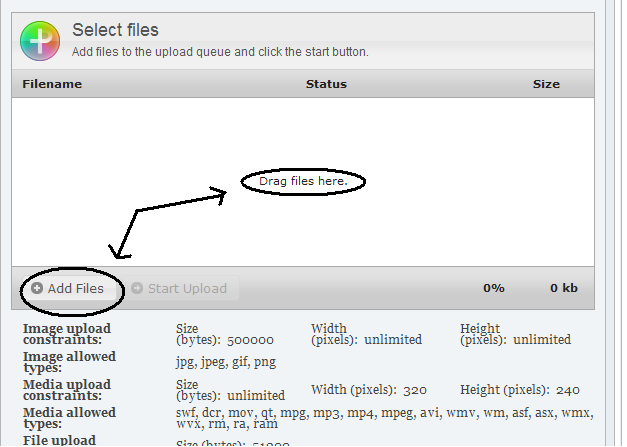
2. Click “Add Files” in the new box at the bottom that appears.
3. You will get a pop-up file navigation box. Go to your file and double-click it or click once and click the “Choose” button.
4. Repeat step 3 for all the files you want to add to your post.
5. Once you’re done adding files, click “Start Upload”. Image and media files should get added into your post automatically. Text files will not, but all the files will appear in the list at the bottom, each with a little check mark to its right to show it got uploaded. Like this:
6. Click the “View Existing File Uploads” button. You’ll get a pop up window showing all the text files you’ve uploaded. It might start with a folder view showing the year and some months. If so, just go to the current month and year:

7. Once you see the text file you uploaded, double-click it to add a link to it in the body of your post. It will look like this:
That’s it! Once the post is published that link will turn into a clickable one, like this:
March 20, 2012 at 1:33 pm #3488
KaldathKeymasterThe First step in post your character is to get the image of of Heromachine. If you are using Heromachine 2.x or earlier you will have to take a screen shoot the process of which varies from Operating system to operating system. If you are having trouble taking a screen shoot tell us your operating system in this thread and we will try to walk you through it.
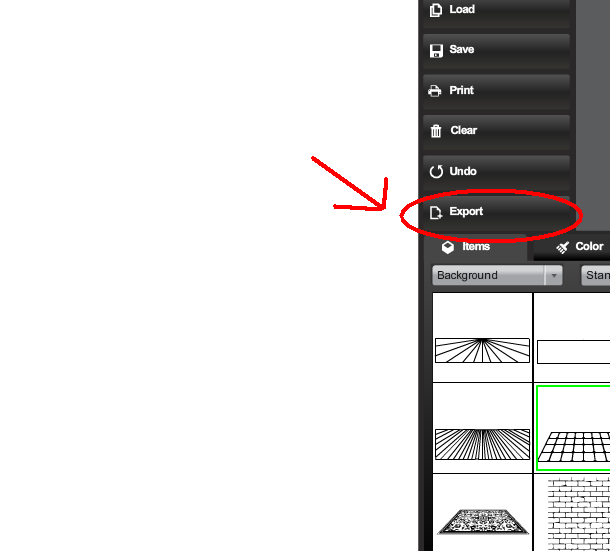
If you are using Heromachine 3 you can still take a screen shoot if you wish or use the built in export feature. To export your pic do the following:
First: Click the Export button

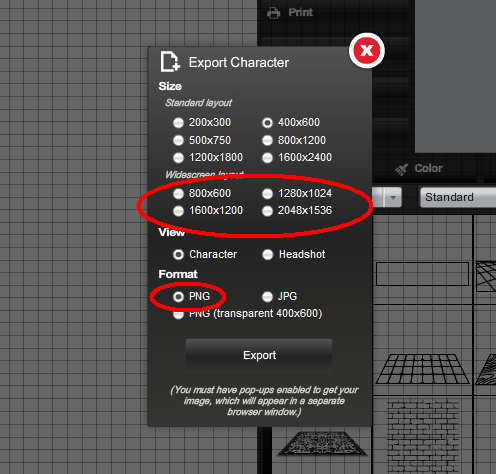
Next: Select the size, layout and file type you want to save your picture in. ( I suggest saving in as a png file in one of the widescreen layouts. ) then click the export button and you will be prompted to save the image as a file on your computer.

Next We will tackle Uploading pictures to the forum.
First, to add an attachment ( picture or text file ) to your post, simply scroll down the page until you see a button that says “Upload Attachment” and Click it.

next, In the box that opens when clicking the upload attachment button you anl either be able to drag the file from you computer to where it says drag file here, or click you can click the Add Files button to browse your computer for the file you want to upload.

Once you have selected or dragged your file or files into place click the Start Upload button. Once you have finished uploading your pictures or text files, and you have completed your post, simple click the submit reply ( or submit topic if it is the first post of a new thread ) button to send the post as usual.
Any Questions please feel free to post them here or send me a Private Message.
March 20, 2012 at 1:40 pm #3490
RhukaMemberHaha. Thanks. As soon as I read your response I noticed the attachments button further down the page. Managed to still be a newb, even though I was trying not to be one. Now I just need to start “spoilering” like you do for a more clean thread.
Thanks for posting this. Even though it seems like a simple thing, it’s nice to have in the FAQ.
March 20, 2012 at 2:00 pm #3482
KaldathKeymasterDon’t mention it, We should have done a tutorial on this already to be honest.
April 3, 2012 at 6:11 am #3987
arkboyMemberi cant found part of
“In the box that open when clicking the upload attachment button you will either be able to drag the file to it, or click the Add Files button to browse for the file. ” until end
WHY ?

please give more tutorial pictures
April 3, 2012 at 8:33 am #3990
KaldathKeymaster@arkboy said:
i cant found part of
“In the box that open when clicking the upload attachment button you will either be able to drag the file to it, or click the Add Files button to browse for the file. ” until end
WHY ?
please give more tutorial pictures
Sorry, some how some of the text in my Tutorial got deleted, I have gone re-written the tutorial repairing the missing parts.
May 28, 2012 at 10:24 am #5963
ScatmanMemberhope this works.my very first time trying to post.I also use Image shack which is a better way to post characters?http://img802.imageshack.us/img802/4796/scatmaninvizoman.png
June 12, 2012 at 9:35 pm #6383
IcewolfMemberI’m not seeing any button to upload attachments on a new post I started for posting my characters. It only let’s me put in text & smileys. o_O
June 13, 2012 at 6:20 am #6395
FRMMemberin whatever image site you’re in right click on the pic and hit “copy image location”, then go to the forums, and hit the button marked “IMG”. paste the image location into the box that pops up, and click “ok”. a bunch of text will pop up where the pic will be. that is supposed to happen. it will appear once you post the reply.
i hope this helps.
August 23, 2012 at 3:53 pm #9855
Bassy99Memberis this right i know its not that good but
August 23, 2012 at 4:18 pm #9858
KaldathKeymasterWelcome to the forums! Not bad for a first effort, and it was posted just fine except you shouldn’t post your pictures in this thread. Create your own Topic in the art gallery section and put your HM pictures there.
August 25, 2012 at 2:58 am #9908
KaldathKeymasterFor those who have missed it, We have noticed a problem posting text file to the forum, and Jeff has made a post on how to work around the problem here in this thread and pinned it to the top of the thread. So if you are having problems go ahead and take a look at the first post of this thread.
September 14, 2012 at 8:41 am #10984
amsParticipantAlso to add, I tried to post a text thread using EXPLORER and when you want to choose your saved text file, it would not show it in my saved file. I had to use CHROME to be able to perform the whole opereation that Jeff explains to do and was successful.
I don’t think WordPress is very Explorer friendly, so try to have an alternate OS in reserve if you need it.
Cheers!
October 6, 2012 at 3:47 pm #11905
HeroFanParticipantHi folks,
I’m just computer illiterate, I can’t seem to figure out how to save my image. I’ve been trying to figure out how to save txt files, but I want to save my HM chars and post them in a thread to get some pointers on how to get better at this. I hate that I have to constantly ask y’all for help, I’ll get it eventually I promise!
Thanks in advance.
October 6, 2012 at 4:40 pm #11906
HarlekinMemberHeroFan i try to make a little tutorial. How to save for png,jpg and txt your pictures.
1. When you finish your picture. Save it.

2. Made a named save of the picture

3. Choose the text option in the save menu

– You can copy all of the text and after when you copy then paste in txt writer or ms office and then save the text file which you easily copy back in hm3 if anyone lost the saved pictures.
4. Save picture.
Choose the export option

5. You can choos of the format of the picture save. If i give advice always save for png better the resolution and not pixelized like the jpg save.

After when you saved find the picture in your computer hard drive and rename it if you want to rename it.
Tip and tricks.
I made very big size aka wide screen sized pictures. – So the widescreen save of the picture is sometimes not enough for me. I printscreen my picture, and paste in ms paint. In paint i cropped the picture for the good size, and save there my pictures.
I hope this help you.
-
AuthorPosts




The topic ‘HOW TO POST YOUR CHARACTER!’ is closed to new replies.

