
Home › Forums › The HeroMachine Art Gallery › HeroMachine 3 Custom Items Archive › Poses › ARTICULATED MAN by Sean David Ross
- This topic has 11 replies, 4 voices, and was last updated 8 years, 4 months ago by
 ams.
ams.

-
AuthorPosts
-
October 11, 2012 at 12:28 pm #465

amsParticipantHey gang! With seeing the old forums locked and possibly down the line closed, I had to preserve these EXCELLENT posing tutorials by Sean David Ross. To see them disappear would be a travesty! These lessons have helped me evolve with using the program and I’m am quite sure they will spark ideas to you all.
These are just cut and pasted staight from the old forum, I have not altered them at all.
October 11, 2012 at 12:30 pm #12084
amsParticipantArticulated Man I
As many of you will know, I’ve been teaching myself how to create more dynamic poses in HM3. None of the experiments are perfect, but I think they’ve been turning out fairly well and others seem to appreciate them as well. Lately, people have asked me to create poses for them or provide instructions on how to make particular poses so I thought I might start to share some posing figures as a sort of reference for people to start making their own poses. This first one is pretty basic but it introduces some concepts that are helpful later:
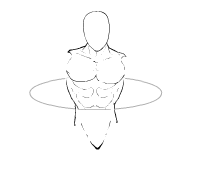
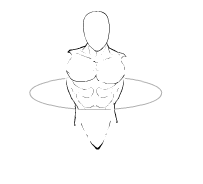
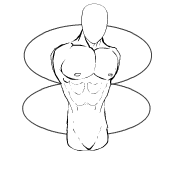
This image consists of 5 parts: A head (my preferred one for posing); a chest; a full torso; the torso is masked to a background shape (a circle); and a lower abdomen/hips. Usually I would set the line colour of the background shape to fully transparent, but for illustrative purposes I’ve left it visible.
This is a basic starter set for making more dynamic poses. Things to notice about this image: the chest/shoulders are tilted down to left at about a 4 degree angle, while the hips are tilted in the opposite direction and the head is also place at a slight angle. Rather than having a ram-rod, stiff figure, this already sets your character apart by being a bit more life-like: in general, people don’t stand at rigid attention, they shift their weight over one hip or the other, and tilt their shoulders in the opposite direction to help maintain balance. The limbs when they are added in will be adjusted to further aid the trunks’ balance while also accomplishing their own goals.
tutorial by Sean David Ross
October 11, 2012 at 12:44 pm #12088
amsParticipantArticulated Man I: You’ve got your head up your….
Before moving on to the 3/4 view, I thought I should add a few more standard posing elements to the first ‘Articulated Man’.The standard HM3 elements assume you will be making fairly standard poses: The arms will be at the figure’s side, or perhaps crossed over the chest, maybe slightly bent; the legs will be straight or slightly bent or perhaps you’ll use the ‘crouching legs’. Nothing too out of the ordinary. Once you start bending the limbs to larger angles though, gaps start to show up in the images you’re producing. In particular, you’ll see gaps in the underarms/lats and behind the legs where the buttocks are noticeably absent. For a fully realized pose, those gaps need to be filled. Personally, I’ve taken to using my ‘head’ to take care of these things…..

Here I’ve added three head images to the Articulated Man I pose: two heads are serving as lat muscles (underarm), and (to keep things simple) I’m using one head to serve as a booty. Depending on your illustration needs, you may need to break down and use two heads (one for each buttock), but if your figure is clothed, a single booty object should suffice most of the time….
These elements are not static. They will need to moved, re-angled, and possibly re-sized depending on the position and angle of their adjoining limbs, tilt of hip, or slouch of shoulder. It’s up to you to decide how best to make them work….
Here’s an example of putting the Articulated pose to work:

That’s a pretty vanilla pose, not too exciting, but it’s actually fairly dynamic by comparison to the poses you’ll normally see posted to these forums. I’ve had to stretch, angle, and resize all of the ‘heads’ I’ve added as armpits and booty replacements. You can load the .txt file into HM3 to check out each of the body elements, angles, and positions. You might even want to play around and make your own poses….
tutorial by Sean David Ross
October 11, 2012 at 12:50 pm #12090
amsParticipantArticulated Man II
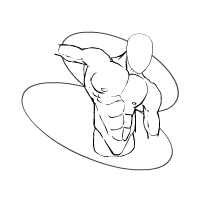
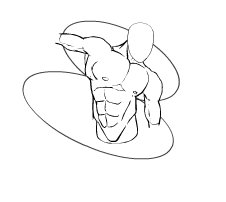
Okay. So. Here’s an Articulated Man for the 3/4 view
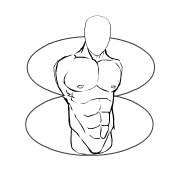
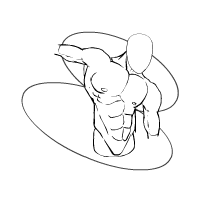
This is actually simpler than the first Articulated man even though we’ve got two background circles this time. There are two copies of the 3/4 male torso, one mapped to each of the background circles. The heads for the armpits and booty are still present, though we’ll tend to need them less often. With the two copies of the torso in place, we can bend and twist the trunk fairly easily.

With a quick flip, the abdomen and chest can be twisted independently from each other.

At this point, you can further refine your poses by introducing two more background circles and mapping two more torso images onto those – one for the neck, and one to focus on just the hips and lower abdomen. I’m not going to do that here – if you need to go to that level, then you should already know how to do that for yourself.
The next post I do here will be Articulated Man III. That version will combine elements from Articulated Man I & II.
tutorial by Sean David Ross
October 11, 2012 at 12:57 pm #12091
amsParticipantArticulated Man III: Twisted Man
As promised, here is the third articulated man.
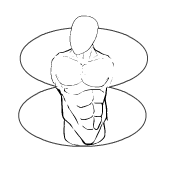
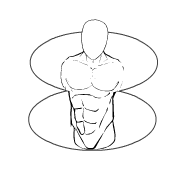
This one combines elements from the previous two articulated men. You’ve got the two background circles on to which are masked two torsos. This time, however, you’ve got two different torsos, one at full view and one at 3/4 view. So, the figure is always twisting away or towards the viewer, but not quite as strongly as was happening in Articulated Man II, when the abdomen and chest were facing in opposite directions.

You could probably use just one background circle (the bottom one) and use the Body>Military Standard>Chest on its own, but the circle is handy to have around in case you want to switch between full view chest or 3/4 view. In fact, to finish off this trunk/torso portion of the posing tutorial, we need to do just that:

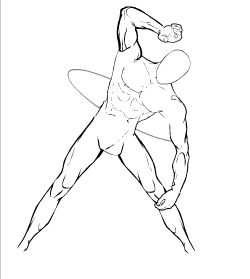
Here we have a similar setup but with the torsos reversed – the 3/4 view is on top and the full abdomen is on the bottom. We’ve also brought back the hips from Body>Male Military to help keep the body balanced. As the following example shows, moving this into a some what more dynamic pose is not terribly difficult and results in softer twisting of the torso than was shown in the last example of my previous post (where the 3/4 torso and abdomen were facing in opposite directions).

And, that’s about it for the trunk/torso. With this alone, your HM3 poses can begin to become more life-like and dynamic. The next level is to bring in the limbs, and then you need to start dealing with foreshortening and perspective. You’ll need to use those tools for the trunk as well once you begin to tilt it towards or away from the viewer. But those will have to wait for another post sometime in the future (I don’t know when….).
tutorial by Sean David Ross
October 18, 2012 at 5:41 pm #12519
djubyParticipant3/4 poses just got way more interesting. Thanks AMS.
October 19, 2012 at 4:52 pm #12589
ScatmanMemberoh! no ams,ya gave him the secret weapon!!look out machiners !As if he couldn’t get any better!
October 20, 2012 at 12:41 am #12598
djubyParticipantSeriously though, it makes a huge difference. Fear me.
October 20, 2012 at 6:14 pm #12667
amsParticipantYes, this technique opens alot of new possibilites when using the program. The whole art of “masking items” lets you be more creative. Soon you will start looking a items not as a whole, but as pieces or sections you can make into other crazy items. This tutorial from SDR evolved the way I use Heromachine. Hopefully, it affects you guys like it did me, so the creative process becomes easier and exciting. Cheers!
….and yes, we fear the djuby.
December 30, 2012 at 12:58 pm #16268
FRMMember(whispered) “what have we unleashed..?”
 August 20, 2014 at 8:47 pm #43542
amsParticipantHey gang. I’m just bumping up this topic to the top of the heap so new ‘machiners can take a look at these fantastic tutorials from SDR. TAKE A LOOK!!!
December 16, 2015 at 8:09 pm #132059
amsParticipantMust read for all newbies!!!
-
AuthorPosts



You must be logged in to reply to this topic.
